Vulcan Rotary 1.0.0
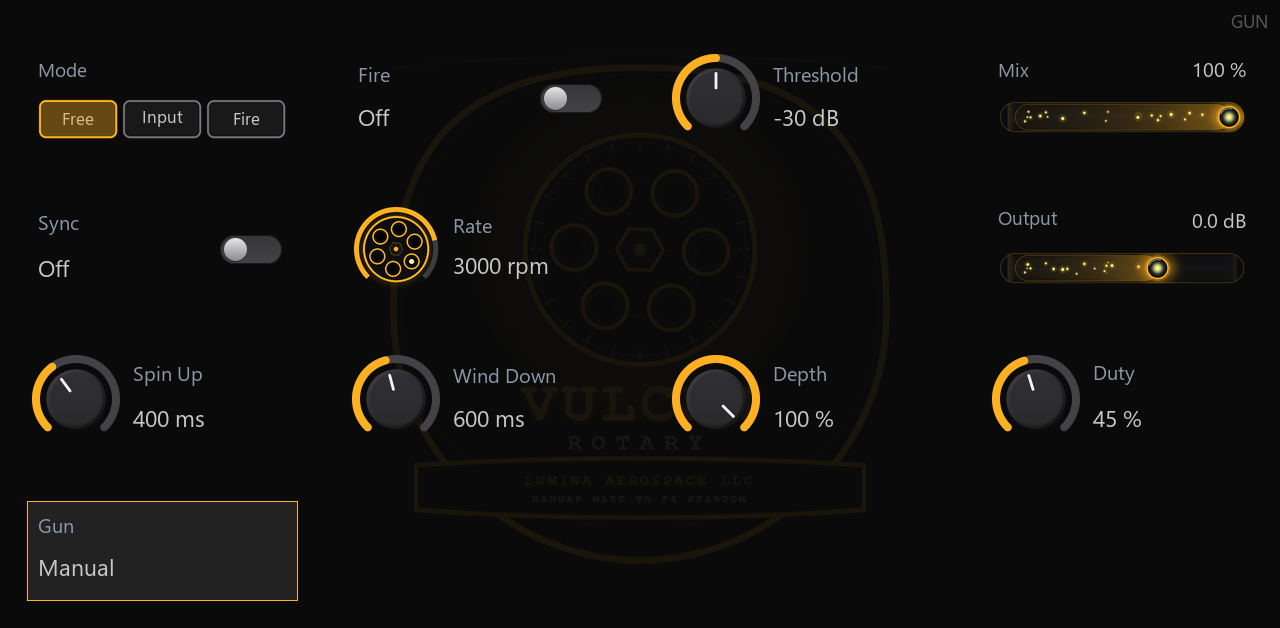
A six-barrel rotary gate and stutter. The barrels spool up from rest and the rate is in real gun rounds per minute (2,500 / 4,000 / 6,000 / 7,200). Modes: Free, Input (your signal is the power supply) and Fire (automatable trigger). 13 programs.
Not yet tested on a real MPC (checked with Akai's host_sim and Open MPC's catalog check). Reports welcome: device, MPC OS version, what happened.
Two zips: *-mpc-armv7.zip for Gen1 (Live, Live II, One, X, Key 61/37, Force) and *-mpc-aarch64.zip for Gen2 (Live III, One G2, Key G2, XL).
Requirements
- A first-generation MPC OS standalone device (32-bit ARM, like the Force, MPC Live / Live II, One, X and Key 61).
The installer refuses anything else. Newer models are untested.
- Root shell access (SSH) to the device. Stock MPC OS doesn't offer this; you need a modded unit.
- Tested on MPC OS with a Force. Installing plugins this way is unofficial: back up first, use at your own risk.
Install (scripted)
- Unzip, then copy the whole folder to the device, e.g.
scp -r Vulcan-Rotary-1.0.0 root@<device-ip>:/tmp/ - Run it:
ssh root@<device-ip> sh /tmp/Vulcan-Rotary-1.0.0/install.sh
The installer checks the device, stops MPC (save your project first), copies portable/Lumina Aerospace LLC - VST - Vulcan Rotary/ (the plugin, its skin and its data, as one folder) into /sdcard/Synths, backs up MPC.settings, adds the plugin to MPC's plugin list from the folder's plugin-meta.xml and starts MPC again. Running it again upgrades in place, keeping your own files. An older install of this plugin (the previous layout, with the .so in /sdcard/vst) is replaced, not duplicated. -y skips the confirmation prompt; -t <folder> installs into another Synths folder (for example on a card).
Then add Vulcan Rotary to a track from the plugin browser (Insert effects). Its screen appears in the plugin view, and the Q-Links follow the page.
Install by hand
- Copy
portable/Lumina Aerospace LLC - VST - Vulcan Rotary/ to /sdcard/Synths/Lumina Aerospace LLC - VST - Vulcan Rotary/. It holds vulcan-rotary-arm32.so, plugin-meta.xml, version.xml, Plugin Skins/
and the data:
- Stop MPC:
systemctl stop acvs. If there is no acvs service (systemctl cat acvs fails, as on some MPC OS 2.x versions and on Hakai-enabled systems), use systemctl stop inmusic-mpc. - Back up the settings file,
MPC.settings (on a Force: /media/az01-internal/Settings/MPC/MPC.settings). - In
MPC.settings, inside <VALUE name="pluginList-arm"><KNOWNPLUGINS>, add the line from plugin-meta.xml with
%payload-path% replaced by /sdcard/Synths. If there is no pluginList-arm value yet, add one just before </PROPERTIES>:
   <VALUE name="pluginList-arm">
     <KNOWNPLUGINS>
       (the line from plugin-meta.xml)
     </KNOWNPLUGINS>
   </VALUE>
- Start MPC:
systemctl start acvs, or systemctl start inmusic-mpc if that is the service you stopped. If MPC shows default settings, restore your backup (the XML was malformed).
Edit MPC.settings only while MPC is stopped: MPC can save its own copy over a change made while it runs. Tools that rebuild the whole plugin list from the plugin folders in Synths keep this plugin, because it is such a folder.