How to install a plugin on your MPC

How to put a plugin on your MPC. The same steps work for all the plugins in the catalog, and the page holds the guide of each one of them.

Before you start

  • A Gen 1 or a Gen 2 MPC: the Live, Live II, XL, One and Force, or the Live III, One Gen 2 and Key 37 Gen 2. These plugins do not run on the MPC Sample, which has its own firmware and its own software.
  • MPC OS 3.10.1 or newer. On that version and on newer ones the external plugins only load when the enhancements are on.
  • The MPC is updated from the device itself. Put it on Wi-Fi, then go to Menu > Preferences > Info, press UPDATE and choose Online Update. The version it is running is on that same tab.
  • A computer. The download is unzipped there and the plugin folder is copied onto the device.
  • Room on the device for the plugin, and for your own samples or presets when the plugin needs them.

How to install a plugin

  1. Download the archive

    When the plugin has a build that runs on every MPC, take that one. It needs MPC OS 3.10.1 or newer.

  2. Copy the plugin onto the device

    Unzip the archive on your computer, then copy the plugin folder into the "VST2 Plugins" folder.

  3. Switch the plugin support on

    On MPC OS 3.10.1 and newer, external plugins only load when the enhancements are on. Go to Menu > Preferences > Enhancements, set Enable Enhancements to On and turn on the plugin support.

  4. Add it to a track

    Open a track, load the plugin from the browser under Instrument or Effect plugins, and it appears with its own screen.

Uninstall it

Delete the plugin folder from the "VST2 Plugins" folder on the device. Move it out of the way instead of deleting it when you want to keep your own files, presets or samples that are inside it.

If something goes wrong

The plugin loads but shows no screen
MPC only draws a skin for a plugin folder that sits in one of its content locations. Copy the plugin folder into the "VST2 Plugins" folder.
The browser only offers "Load Plugin"
The plugin folder sits on a mount that cannot run code, which is the case for the SSD of a Force. Copy the plugin folder to the internal drive instead.
The plugin does not show up in the browser
On MPC OS 3.10.1 and newer, external plugins only load when the enhancements are on. Check Menu > Preferences > Enhancements, and that the plugin folder sits in the "VST2 Plugins" folder.

The guide of all the plugins in the catalog, with the build to take and the steps that go with it. Every guide is written by hand for the plugin it belongs to.

ans-1964

Instrument v1.1.2

Downloads

  • Download ans-1964-1.1.2-linux-vst2.zip 2 MB 2ff270637764
  • Download ans-1964-1.1.2-linux-vst3.zip 3 MB 55293c8c1ec9
  • Download ans-1964-1.1.2-mpc.zip 601 KB 473358c43792

The author says

First public release of ANS 1964, an independent emulation of the 1964 five-disc ANS photoelectronic synthesizer.

Assets

AssetTarget
ans-1964-1.1.2-mpc.zipAkai MPC OS 3.10.1+ (ARM32 + ARM64), including install notes and licenses
ans-1964-1.1.2-linux-vst2.zipLinux x86_64 desktop VST2
ans-1964-1.1.2-linux-vst3.zipLinux x86_64 VST3 with the graphical score editor

MPC

Unzip and copy the bokontep - VST - ANS 1964 folder into a folder named exactly VST2 Plugins at the root of a USB drive, SD card, or the MPC's internal drive. On the MPC enable Preferences → Enhancements (Beta) → Enable Enhancements and External Plugin Support, then insert the plugin on an instrument track. Requires MPC OS 3.10.1 or later.

Linux VST3

Unzip ans-1964-1.1.2-linux-vst3.zip and copy ANS 1964.vst3 to ~/.vst3/. The bundle includes the score-editor GUI. Run and Backward are latching toggles; select User Score, draw on the canvas, and press Run. The YAWN state-sync patch and build instructions are in the repository.

Linux VST2

Unzip and copy the desktop-VST2 folder into ~/.vst (or the host's VST2 folder). This build has no custom editor; the host shows the parameters.

Verification

  • MPC host simulator: 19 passed, 0 warnings, 0 failures at 44.1 kHz/128 frames

and 48 kHz/512 frames.

  • MPC skin validation: 0 errors, 0 warnings.
  • VST3 built from the tagged source with JUCE 7.0.12.

License

GPL-3.0-or-later. The MPC Plugin SDK is MIT-licensed; JUCE and the VST3 SDK are used under GPLv3. The source, build scripts, notices, and research report are in the repository: <https://github.com/tkleisas/ans-1964>.

Checksums

473358c4379248fe67c1a98b6947a24b4292e84eb4ddd7b67fb218a4629c76af  ans-1964-1.1.2-mpc.zip
2ff27063776453abbc4ae10a7fc08cf1977d0ed1ded1deafc2c6836c63cbda74  ans-1964-1.1.2-linux-vst2.zip
55293c8c1ec9410adc9f37efc374a8f7c2306d427973091061fc7c2a83a7850f  ans-1964-1.1.2-linux-vst3.zip

Audiofeel

Instrument v1.1.0

Downloads

The author says

Three new instruments: Leadline (mono lead), Padscape (pad synth) and Chordbox (chord synth, manual or in a scale).

  • MPC: one zip per new plugin (unzip, copy the AudioFeel - VST - <Name> folder into VST2 Plugins on a drive; needs MPC OS 3.10.1+ with External Plugin Support on).
  • Windows: audiofeel-1.1.0-windows-vst2-x64.zip contains all seven plugins (VST2, 64-bit; no custom UI).

Tested on an MPC One+ (OS 3.10.1) and Ableton Live 12 only. The four earlier plugins are unchanged on the MPC side (see v1.0.0).

bytebeat-vst

Instrument v0.3.1

Downloads

  • Download bytebeat-machine-0.3.1-linux-vst2.zip 871 KB
  • Download bytebeat-machine-0.3.1-linux-vst3.zip 4 MB
  • Download bytebeat-machine-0.3.1-mpc.zip 439 KB
  • Desktop bytebeat-machine-0.3.1-windows-vst2.zip 1 MB
  • Desktop bytebeat-machine-0.3.1-windows-vst3.zip 3 MB

The author says

Bytebeat Machine 0.3.1

Bytebeat instrument for Akai MPC OS 3.10.1+, desktop VST2, and Linux/Windows VST3.

Downloads

  • bytebeat-machine-0.3.1-mpc.zip — MPC ARM32/ARM64 external plugin
  • bytebeat-machine-0.3.1-linux-vst2.zip — Linux desktop VST2
  • bytebeat-machine-0.3.1-linux-vst3.zip — Linux VST3
  • bytebeat-machine-0.3.1-windows-vst2.zip — Windows desktop VST2
  • bytebeat-machine-0.3.1-windows-vst3.zip — Windows VST3

Highlights

  • Gated Free play mode: one continuous clock and formula state; pads gate

the output and apply note, pitch, velocity and aftertouch while held, without resetting t. Last-note priority.

  • Aftertouch is available to formulas as aftertouch (0–1, smoothed),

from channel pressure and polyphonic aftertouch.

  • Pitch tracking is on by default; pads transpose the running pattern.

MPC Root defaults to 36.

  • Default MPC play mode is Trigger, so a new instance is silent until a

note is played.

  • Free and Sync accept pad notes as pitch/velocity modulation. Sync follows

the host transport while playing and free-runs when stopped.

  • Existing formulas keep the same globals; a remains Macro A.

Install — MPC

Requires MPC OS 3.10.1 or later.

  1. Unzip bytebeat-machine-0.3.1-mpc.zip.
  2. Copy the whole bokontep - VST - Bytebeat Machine folder into a folder

named VST2 Plugins at the root of a USB drive, SD card, or the MPC's internal drive.

  1. On the MPC: Preferences → Enhancements (Beta) → enable

Enable Enhancements and External Plugin Support, then restart.

  1. The plugin appears under External Plugins. If it was already loaded on a

track after an update, remove and re-add it.

Install — desktop VST3

Unzip the version for your OS and copy the whole Bytebeat Machine.vst3 folder to:

  • Linux: ~/.vst3
  • Windows: C:Program FilesCommon FilesVST3 or

%LOCALAPPDATA%ProgramsCommonVST3

The VST2 builds are included for older hosts.

Validation

  • Core tests: 3367 checks, 0 failures
  • MPC host simulator: 19/19 PASS
  • VST3 tests pass
  • pluginval level 8: SUCCESS

Licence

GPL-3.0-or-later. See LICENSE and NOTICE.md. JUCE 7.0.12 and the bundled VST3 SDK are used under GPLv3; QuickJS-NG is MIT. The MPC Plugin SDK is MIT.

CSXXL

Instrument v1.0.13

Before you start

Build
This is the 32-bit build. It runs on the MPCs that use 32-bit software.

Downloads

The author says

CSXXL 1.0.13

Tested on the Force.

Q-Links and faders follow each other, like in the other L'Cronx plugins:

  • Turn a Q-Link and the fader of that page moves.
  • Touch a fader on screen and its Q-Link name and value follow.
  • Done per control, no page redraw, nothing polled, cheap on CPU.

Ribbon on FILTER works on every patch: it moves the cutoff you actually hear. Slide left to close the filter (down to 40 Hz), right to open it (up to 18 kHz), the full way at RNG 50. Before, patches with a wide-open filter did not react.

Also: built against the current mpc-vst-plugins wrapper; momentary buttons keep their 1.0.12 tap behaviour.

Install: unzip CSXXL-1.0.13-mpc-armv7.zip and run install.sh on the Force (ARMv7, MPC OS 3.x). 768 factory presets, room for 1500.

Licence: PolyForm Noncommercial 1.0.0. Free, not for sale. Changelog: CHANGELOG.md.

CTRL-MixBus

Effect v2.2.0

Before you start

Build
This is the 64-bit build. It runs on the MPCs that use 64-bit software.
Which download
The plugin is published once per architecture. Take the build that runs on every MPC when there is one, the 64-bit build on a 64-bit MPC and the 32-bit build on a 32-bit one.

Downloads

The author says

INPUT page: Consolidated STEREO section with GAIN, WIDTH, BASS FREQ, and BALANCE controls, each with its own ON/OFF button. Added a new TRANSIENT shaper with ATTACK, PUMP, SUSTAIN, and SPEED controls, along with CLIP, -3DB, -6DB, and ON/OFF options. The GATE has also been moved from the OUTPUT page to the INPUT page, placing it before the filters.

  • OUTPUT page: Added a new COMPRESSOR with THRESHOLD, ATTACK, RELEASE, and RATIO controls, along with CLIP, RMS, PEAK, and ON/OFF options. Added dedicated IN, COMP, MAX, and OUT meters. The MAXIMIZER now also includes an ON/OFF button.
  • Q-Link controls: Q-Links now follow the selected button. Tapping a button automatically switches the Q-Links to control the corresponding column.
  • CPU performance: Benchmarked on an MPC One (Gen2) running MPC OS 3.10.1. Worst-case p99 CPU usage was 3.1%, with a worst-case single audio block usage of 3.4%. PASS. See [docs/BENCH.md](docs/BENCH.md) for benchmark details.
  • Tested platforms: MPC One (Gen2), MPC Live III (Gen2), and Force (Gen1), all running MPC OS 3.10.1.
  • Project compatibility: Existing projects remain compatible. Parameters have only been added, with no existing parameters removed. GAIN is now always active, and PHASE INVERT operates independently. The previous GAIN ON/OFF and PHASE ON/OFF switches have been retired.

davis-spectral-sidechain

Instrument v1.6.7

Before you start

Build
This build runs on every MPC, on MPC OS 3.10.1 or newer.

Downloads

The author says

DAVIS Spectral Sidechain 1.6.7

A big update since 1.4.2: you now see the kick on the graph and place the band on it by eye. Positive Amount is clean, and the screen is lighter on the MPC.

What's new

  • SC view (grey button): the kick's spectrum as grey bars behind the curves. You see where the kick sits and move the Freq slider onto it. The bars follow each hit and are down before the next one.
  • OUT as bars (green button): the output's spectrum as green bars, so you see the hole the kick opens in the bass. 56 bars each for SC and OUT.
  • Clean boosts: the detector now listens to the whole sidechain (its peak over 20 ms), so a kick at 50 Hz can lift a hi-hat at 8 kHz with no chirp or flutter. While the band boosts, a soft limiter keeps the output under 0 dBFS.

What changed

  • SC peak and TO FREQ are gone: the SC view replaces them, and the Freq slider is the only frequency control.
  • Knob ends show real values: Amount -60 dB / +30 dB, Ratio 1:1 / 21:1, Thresh -60 dB / 0 dB, Atk and Rel 1 ms / 500 ms. They used to say CUT and FULL; the sound at those ends is the same.
  • Q-Link names: FREQ, Q, RATIO, THRESH, ATK, REL, AMOUNT, MODE.
  • New look: the band's line is yellow, the live curve is a stronger red, and the SC and OUT buttons keep their colours when off.
  • Lighter on the MPC: far fewer screen updates, which fixes the stutter and crackle of the first SC view builds.
  • Saved projects: projects saved with 1.4.2 load with their settings. SC and OUT start off.

Tips

  • Turn off SC and OUT on the instances you are not looking at. The sound is the same; only the drawing stops. An instance keeps computing its graphs even with its screen closed, because the MPC doesn't tell the plugin when its screen is open. With two instances, CPU went from 24 % with the graphs on to 21 % with them off.
  • Quick start: kick track = SEND, A. Bass track = RECEIVE, A. Turn SC on, play the kick, move Freq onto the grey bars, and start with Amount at -12 dB (-60 dB for a full hole).
  • Lift instead of cut: a positive Amount on a hi-hat or a clap brings it up on each kick.
  • Atk and Rel depend on Thresh: with a high threshold, a slow attack takes longer to start acting. If the band reacts late, lower Thresh.

Install

Unzip and copy the DAVIS - VST - Spectral Sidechain folder into VST2 Plugins on your MPC, then restart. Needs MPC OS 3.x (MPC Live / Live II / One / X / Force).

Tested on: MPC Live II, MPC OS 3.10.1

dexed

v2.0.5

Before you start

Build
This build runs on every MPC, on MPC OS 3.10.1 or newer.
Which download
The plugin is published once per architecture. Take the build that runs on every MPC when there is one, the 64-bit build on a 64-bit MPC and the 32-bit build on a 32-bit one.

Downloads

The author says

Dexed (DX7) 2.0.5

Favourites survive an upgrade. The installer now lists favourites.dat as your data, so installing a new version (with install.sh or the OpenMPC Plugin Manager) keeps your favourites. Before, only your carts were kept and an upgrade deleted the favourites.

README: install steps per format (the VST2 Plugins folder or install.sh, by hand or with the Plugin Manager), and a new section on backing up and restoring your favourites and carts.

Nothing else changed: same sound, parameters and ID, so saved projects load as before. Zips: -mpc-armv7 (Force, Live, One, X, Key), -mpc-aarch64 (Gen 2 units), and -mpc-sdk (one folder for MPC OS 3.10.1's VST2 Plugins).

Drips

Effect v1.1.0

Before you start

Build
This build runs on every MPC, on MPC OS 3.10.1 or newer.
Which download
The plugin is published once per architecture. Take the build that runs on every MPC when there is one, the 64-bit build on a 64-bit MPC and the 32-bit build on a 32-bit one.

Downloads

The author says

A granular texture synthesizer from Emilie Gillet's open-source Beads: four recording qualities, a delay and beat slicer, tempo-synced seeding, wavetables, a modulation page and a built-in manual.

1.1.0 is built with Akai's official MPC Plugin SDK and runs on MPC OS 3.10.1 with Enhancements → External Plugin Support. No modded firmware or root access needed any more.

What's new

  • Modulation on the main page: a teal dot circles every knob the matrix moves; the snowflake lights up while the matrix freezes.
  • RANDOM knobs behave like the module's: while the matrix drives TIME, SIZE, SHAPE or PITCH, that RANDOM knob is off and greyed out (as when a cable is patched into the module's jack).
  • Freeze toggle: a white outline when on, so switching on no longer looks like a size jump.
  • Manual: larger text (15 px) and a "Support the project: Ko-Fi.com/padbangers" line under the topic list.
  • Same plugin ID and parameters as 1.0.x: projects saved with 1.0.x load in 1.1.0.

Install (MPC OS 3.10.1+)

  1. On the MPC: Preferences → Enhancements (Beta) → switch on Enable Enhancements and External Plugin Support.
  2. Unzip Drips-1.1.0-mpc-sdk.zip and copy the folder Padbangers - VST - Drips into the VST2 Plugins folder of a drive on the MPC (internal storage, SSD, SD card or USB).
  3. Restart the MPC. Drips is listed under External Plugins (Insert effects).

Or install it with the Plugin Manager from the catalog. The per-build zips (-armv7 for first-generation devices, -aarch64 for second-generation) are what the Plugin Manager and the catalog installers use.

Tested

Akai MPC X, MPC OS 3.10.1 (2026-11-14). Not tested on MPC OS 3.9.1.

SHA-256

  • Drips-1.1.0-mpc-armv7.zip: 6f1b211dbf3f3aea8ec20d8c111b52e6e6d90161b17fc3ce217dae88efca6a04
  • Drips-1.1.0-mpc-aarch64.zip: 000d04fd2c8f162c8aecaa035291e7da427d8d4528514b08fe940885f45d0426
  • Drips-1.1.0-mpc-sdk.zip: f7f8325e1ca8316ae5397706e872038a70ecd2a48031971c9a480e1a72335a10

Esque80

Instrument v0.9.1

Before you start

Build
This build runs on every MPC, on MPC OS 3.10.1 or newer.
Which download
The plugin is published once per architecture. Take the build that runs on every MPC when there is one, the 64-bit build on a 64-bit MPC and the 32-bit build on a 32-bit one.

Downloads

The author says

ESQUE80 is an 8-voice cross-wave synthesizer for Akai MPC standalone hardware: three wavetable oscillators per voice, a 4-pole low-pass filter, four envelopes with live touch-editable displays, three LFOs and a 15-source mod matrix with tap-to-pick routing, on an eleven-page touch panel.

Changes since 0.9.0

  • The data-conversion script has been removed from the project. The README now documents the wave-data file formats (wave0-3.bin, waves.txt, .pcb) for users who have a dump of their own instrument, and no longer points at any source for that data.
  • The plugin itself is unchanged apart from its version number.

Which file

FileFor
ESQUE80-0.9.1-mpc-sdk.zipAny MPC on MPC OS 3.10.1 or later with External Plugin Support enabled. Unzip and copy the Lichthaus - VST - ESQUE80 folder into VST2 Plugins. No modification of the MPC needed.
ESQUE80-0.9.1-mpc-aarch64.zip64-bit (Gen2) devices, for the Open MPC Plugin Manager and installers.
ESQUE80-0.9.1-mpc-armv7.zip32-bit (Gen1) devices and the Force, for the Open MPC Plugin Manager and installers.

The two per-device zips include the community installer for modified MPCs; its instructions are in INSTALL.md inside each zip.

Wave data

This release contains no original wave data. ESQUE80 builds 75 stand-in waves at start-up and offers 6 built-in presets plus 40 user slots, so it plays out of the box, but it will not sound like the instrument it is modelled on.

Tested

  • MPC Key 37 (Gen2), 64-bit build, MPC OS 3.10.1.
  • MPC Live II, 32-bit build, MPC OS 3.10.1.

Both were installed by copying the folder into VST2 Plugins. The scripted installer in the per-device zips has not been run by the author.

Checksums

See SHA256SUMS.txt.

Euclid

v2.0.0

Before you start

Build
This build runs on every MPC, on MPC OS 3.10.1 or newer.
Which download
The plugin is published once per architecture. Take the build that runs on every MPC when there is one, the 64-bit build on a 64-bit MPC and the 32-bit build on a 32-bit one.

Downloads

The author says

Euclid 2.0.0

Euclidier is now Euclid. Same plugin id, so saved projects still find it.

New

  • ALL view on the LANES tab: FILL, VELOCITY, HUMANIZE and GATE change all eight lanes together, relative to each lane's own value. The circle shows the longest pattern.
  • Tap to draw steps on the circle and on the lane rows. A hand-made pattern is kept and saved with the project until STEPS, FILL or SHIFT change, or you randomise.
  • DRUM MODE ALL gives lanes 1-8 the notes 36-43.
  • MIDI CH is a stepper. NOTE is last in its row, MODE sits under it, and the knobs have the orange highlight.
  • Randomise now gives a fill from 1 up to half the new step count.

Better timing

  • The sequencer now runs inside the plugin, in step with the project transport (loops, locates, tempo changes), instead of as a separate program.
  • Note lengths are exact, and every note-on has its note-off.

Changed

  • The MIDI port is now called "Euclid". A track routed from the old "Euclidier" port needs its MIDI input set again.
  • Steps, fill, shift and loop go up to 32 (they were 64).
  • The 128-slot preset page is not on the screen. Your 1.x preset bank file is kept.

Installing

  • Plugin Manager: updates Euclidier in place; the old folder is removed and the preset bank moved across.
  • Or use the zip for your device (-aarch64 for Live III, -armv7 for Force) and follow INSTALL.txt. A rooted device is required.

Fretty

Instrument v0.8.6

Before you start

Build
This build runs on every MPC, on MPC OS 3.10.1 or newer.
Which download
The plugin is published once per architecture. Take the build that runs on every MPC when there is one, the 64-bit build on a 64-bit MPC and the 32-bit build on a 32-bit one.

Downloads

The author says

Fretty v0.8.6

What's new

  • BROWSE page: a preset browser on its own page (on the MPC and the desktop): 10 categories on the left, the presets in two columns, the loaded preset's name at the top (* once edited), ▲ ▼ to page through ALL. Saved projects and MPC's PRESET menu work as before.
  • Mono output option: in Logic (and other hosts) the plugin can also go on a mono instrument track; the sound is the stereo sound folded to one channel.
  • MPC OS 3.10.1: the plugin folder carries a plugin.json, so it can be copied straight into VST2 Plugins, and an Akai SDK-format zip (-mpc-sdk.zip, one folder for every MPC) comes with the release.
  • Lower notes: C1–D♯1 (the four keys below E1) now play notes on every instrument except the acoustic, which keeps its body knocks there. Those keys were silent before, so existing beats sound the same, and every note that played before is unchanged.
  • Gen2 MPCs: a -mpc-aarch64.zip for Gen2 devices (MPC Live III, Key 37, XL), next to the Gen1 -mpc-armv7.zip.
  • Desktop VST3 for MPC Desktop and DAWs: Fretty-0.8.6-macos-vst3.zip (one file for Apple Silicon and Intel Macs, with the same touchscreen skin in the plugin window) and Fretty-0.8.6-windows-vst3.zip (64-bit, with the same skin in the plugin window).
  • Audio Unit for Logic Pro and GarageBand: Fretty-0.8.6-macos-au.zip has the plugin as an Audio Unit (.component, Apple Silicon and Intel), with the same sound, skin window, presets and saved settings as the VST3. It passes Apple's auval validation. It's a separate download from the VST3 zip.
  • Device projects open on the computer: the VST3 has the VST2's official replacement ID, so a project saved on the MPC with this plugin loads it in MPC Desktop (controller mode) instead of showing a missing plugin, with the same sound and settings. A project saved on the desktop opens on the MPC the same way.
  • Window size on the desktop: right-click the plugin window (Control-click on a Mac) and pick 50% to 125%. It opens at 75% and remembers your choice for all of these plugins.

Fixed

  • Desktop: a safety net on the plugin's output: if a block ever came out broken (not a number, or far past full scale), it plays as silence instead of blasting the mix.
  • Windows: MPC 3 now loads the plugin (before, it was listed but couldn't be added: a Windows-only interface ID layout bug). It's a single .vst3 file with its skin and sounds inside (unpacked once on first load), the format MPC 3 scans; no extra folders.
  • Desktop parameter list: in MPC 3 (controller mode, the MPC's screen) and in DAWs the plugin now lists only its sound controls, the knobs, switches and Q-Link controls, instead of every internal value (themes, browser, screen text). Picking a preset no longer marks it as edited (no "*").
  • Mac: macOS no longer blocks the plugin as "can't be verified" when installed with the one-line Terminal command in the zip's README.txt (it also unblocks copies you already installed).
  • Saved MPC projects now keep this plugin's settings. Before, the plugin saved nothing into the project, so it came back at its default sound when the project was reopened.

Installing on macOS (Audio Unit and VST3)

Which zip?

  • Logic Pro / GarageBand: Fretty-0.8.6-macos-au.zip (the Audio Unit)
  • MPC Desktop / other VST3 hosts: Fretty-0.8.6-macos-vst3.zip (the VST3)

Both work on Apple Silicon and Intel Macs. Download one or both.

1. Leave the zip(s) in your Downloads folder. Unzipped or not, both are fine.

2. Open Terminal (Applications › Utilities › Terminal), paste this and press Return. It installs the plugins and clears macOS's "can't be verified" block. No password needed.

curl -fsSL https://raw.githubusercontent.com/3dthc/mpc-vst-plugins/desktop-vst3-openmpc/tools/install_mac_vst3.sh | bash

3. Check the Audio Unit: paste this and press Return. Every plugin should say PASS.

curl -fsSL https://raw.githubusercontent.com/3dthc/mpc-vst-plugins/desktop-vst3-openmpc/tools/install_mac_vst3.sh | bash -s -- --check

4. Restart Logic Pro (it looks for new Audio Units when it starts), or rescan plugins in MPC Desktop.

To check just this plugin: auval -v aumu FrTy 3Dth

Install: see INSTALL.md inside the zip.


Built by GitHub Actions from 3dthc/fretty-mpc@5a96b5f with mpc-vst-plugins@8608070.

frodhes

v0.9.13

Before you start

Build
This is the 64-bit build. It runs on the MPCs that use 64-bit software.
Which download
The plugin is published once per architecture. Take the build that runs on every MPC when there is one, the 64-bit build on a 64-bit MPC and the 32-bit build on a 32-bit one.

Downloads

The author says

Frodhes 0.9.13: a physically modelled electric piano, vibraphone and marimba for the M-VAVE FM-1, the Ableton Move, the Akai MPC and your computer. Every note is computed live from the mechanics of the instrument; there are no samples.

Download: frodhes.fwsc below (the same file as frodhes-0.9.13.fwsc; the newest is always at https://github.com/leonardoMirabal/frodhes/releases/latest/download/frodhes.fwsc). Try it first in your browser: https://leonardomirabal.github.io/frodhes/

Install

FM-1: download frodhes.fwsc below. Install it from the emulator page (Chrome or Edge, Install on your FM-1 or SMK-37), or from a terminal:

pip install mido python-rtmidi
python3 tools/fm1_install.py frodhes.fwsc

Your settings, presets and pattern are kept. If anything goes wrong, switch the FM-1 off, hold OCT− and switch it on: that is the USB rescue, and you can install again from there.

Computer (plugin): frodhes-plugin-macos.pkg (or frodhes-plugin-macos.zip), frodhes-plugin-windows.zip, frodhes-plugin-linux-x86_64.zip or frodhes-plugin-linux-aarch64.zip below. How to install each: PLUGIN.md.

Move: you need Schwung on the Move. Install Frodhes with Schwung Manager in a web browser: Install Custom Module > From GitHub URL, leonardoMirabal/frodhes. Or download frodhes-module.tar.gz below and use From Tarball. Details: the Move manual.

Akai MPC: frodhes-mpc.zip below (MPC OS 3.10.1 or later, External Plugin Support on). Copy its folder Frodhes - VST - Frodhes into VST2 Plugins at the top of the MPC's drive. Details: MPC.md.

SMK-37 Pro, SMK-37 Elite, MKE-P37: frodhes-smk37-pro.fwsc, frodhes-smk37-elite.fwsc and frodhes-mke-p37.fwsc below. Read SMK37.md first.

New in 0.9.13

  • Akai MPC: Frodhes can be installed and updated from the community's Open MPC plugin catalogue with its Plugin

Manager, which picks the build for your MPC. Each release now also has the catalogue's two packages, one for the 32-bit and one for the 64-bit MPC models. Installing by hand from the release's zip works as before.

Fixed

  • ARPEGGIO page: after ARP GATE was set over MIDI to a value between the 5 % steps (such as 73 %), turning GATE

kept the odd value (78 %, 83 % ...), so the round steps could not be reached. Now the first step of the knob lands on the 5 % step in the direction you turn, then it steps 5 %.

  • TEMPO page: after a tapped tempo or a MIDI clock left the tempo between whole numbers (such as 120.1 BPM), turning

BPM kept the tenth (119.1, 121.1), so 120 could not be set again by hand. Now a slow turn steps 0.1 BPM, so 120.1 turns down to 120.0 and every tenth can be set by hand; a fast turn moves 1 to 4 BPM a click. The plugin's BPM - / + keys step 0.1 BPM too (Shift with the arrow keys: 1 BPM).

  • With a MIDI clock running (CLOCK on EXT, a computer or a drum machine sending it), setup changes such as the MIDI

channel, the display or a tapped tempo were not saved until the clock stopped, so switching off first lost them. Now they are saved as usual, about 2 s after the change once the sound has died away, and the sequencer's pattern too while the sequencer is stopped. The clock keeps its tempo and its beat through the save.

  • FILTER: at a very low FREQ the filter could keep a faint hum going after the notes ended (pulsing with TREM), so the

sound never went fully silent and saves kept waiting. The tail now ends in silence.

  • REVERB INFINITE: the INFINITE reverb could build up to full level at low DECAY or a dark TONE and stay there, even

after the reverb was switched OFF; fixed. Its tail now always fades at the DECAY you set, and INFINITE picked again after its tail has ended starts fresh.

  • Akai MPC: the knob pictures on the plugin's pages were taller than the largest picture the MPC loads. They are now

within that size; the knobs look as before and their pictures move in slightly coarser steps (105 instead of 127).

  • Akai MPC: installed with the open-mpc Plugin Manager (version 1.2.0 and older), Frodhes did not show up in the

plugin browser: the manager pointed the MPC at the plugin's binary by its bare file name, and the binary sat in a subfolder. The two binaries (32-bit and 64-bit) are now at the top of the plugin folder, where every installer looks. Installing by hand: replace the whole folder "Frodhes - VST - Frodhes" (delete the old one first).

  • Desktop plugin: the BPM control's buttons, arrow keys and drag now share the tempo's own range, 40 to 240 BPM.

Dragging past either end no longer leaves a stretch of dead travel before the value moves back.

  • Presets: turning PRESETS and pressing SAVE within a moment could load the preset you had turned to just after the

save (or after HOME cancelled it), so a different sound played than the one you had just saved. Now the sound you saved, or the one you had, keeps playing. A Program Change arriving while you browse no longer has it either.

  • RESPONSE B: on VIBES, playing harder could come out slightly softer between soft and medium touches; fixed. On

VIBES and MARIMBA, B now lifts the soft end smoothly, so every harder strike is louder, with the same tone.

  • DELAY: after one note through ANA, every later turn of TIME glided for many seconds (39 ms to 1.17 s took about

18 s) and the next echoes came bunched and bent. The delay now comes fully to rest once its last echo has died away, and TIME then jumps straight to the new value, as it always did before any note.

  • TUNE turned while notes were held: the held notes jumped to the new tuning at the next pitch-bend message. A note now

keeps the TUNE it was struck with; the bend moves it by the bend alone.

  • Pitch bend on a big chord: with more than four notes sounding, the notes followed the wheel in steps and up to 20

cents apart from each other. Every sounding note now follows the wheel together.

  • Half pedal (CC 64 between 42 and 63): the key-up knock and the felt's sound came at full strength, as with the pedal

up. They now follow how lightly the dampers touch.

  • Playing more notes than there are voices: the cut of the oldest note, when a new one takes its voice, is smoother

(a loud low note no longer ticks under a soft new one); the new note starts as early as before.

  • TREM/WAH: switching the effect off with its EFFECT card forgot which one was on, so pressing LFO twice (or

turning its depth up on PERFORM) brought back PAN instead of the WAH or TREM you had. Now it brings back the one that was on.

Full manual: https://github.com/leonardoMirabal/frodhes/blob/main/docs/MANUAL.md · Built on Dinghy. GPL-3.0.
glass-spheres

Instrument v1.1.0

Before you start

Build
This build runs on every MPC, on MPC OS 3.10.1 or newer.
Which download
The plugin is published once per architecture. Take the build that runs on every MPC when there is one, the 64-bit build on a 64-bit MPC and the 32-bit build on a 32-bit one.

Downloads

The author says

Mutable Instruments Marbles' random generators as an MPC plugin: random gates and voltages to the MPC X's CV/Gate jacks, or played as MIDI notes and CCs, with two envelopes, two LFOs, an 8-slot modulation matrix and a built-in manual.

1.1.0 is built with Akai's official MPC Plugin SDK and runs on MPC OS 3.10.1 with Enhancements → External Plugin Support. No modded firmware or root access needed any more.

What's new

  • Modulation on the main page: a teal dot circles each of the seven knobs the matrix moves (T Rate, T Bias, Jitter, Deja Vu, Steps, Spread, X Bias).
  • Y / CLOCK page: the Y tag now spans the whole Y section (knobs and lists).
  • CV and MIDI out work unchanged under MPC OS 3.10.1.
  • Manual: larger text (15 px) and a "Support the project: Ko-Fi.com/padbangers" line under the topic list.
  • Same plugin ID and parameters as 1.0.x: projects saved with 1.0.x load in 1.1.0.

Install (MPC OS 3.10.1+)

  1. On the MPC: Preferences → Enhancements (Beta) → switch on Enable Enhancements and External Plugin Support.
  2. Unzip Glass-Spheres-1.1.0-mpc-sdk.zip and copy the folder Padbangers - VST - Glass Spheres into the VST2 Plugins folder of a drive on the MPC (internal storage, SSD, SD card or USB).
  3. Restart the MPC. Glass Spheres is listed under External Plugins (Instruments).

Or install it with the Plugin Manager from the catalog. The per-build zips (-armv7 for first-generation devices, -aarch64 for second-generation) are what the Plugin Manager and the catalog installers use.

Tested

Akai MPC X, MPC OS 3.10.1 (2026-11-14). Not tested on MPC OS 3.9.1.

SHA-256

  • Glass-Spheres-1.1.0-mpc-armv7.zip: 4958c653d1ee4c1340f638bdbd2b5efa2ebffac747c1b4311b5a032086673eec
  • Glass-Spheres-1.1.0-mpc-aarch64.zip: 3f12b9cf31900f688f8d916d642794ef8c19fe49ed0e9e3a88aa8a556eb8fd3b
  • Glass-Spheres-1.1.0-mpc-sdk.zip: 19920c26d94077b15c206f46fb0306f9203fc7de73e26c34c3b97e1035efe5d4

grainbloom

v1.0.0

Before you start

Build
This build runs on every MPC, on MPC OS 3.10.1 or newer.

Downloads

The author says

First release of Grainbloom, a granular texture and micro-loop effect for MPC standalone.

What it does

  • Seven modes: Collage, Cloud, Stutter, Shimmer, Shatter, Arpeggio and Cascade.
  • Grain, Scatter, Space and Mix macros on an animated BLOOM page, with every setting on the CONTROLS page.
  • Tempo sync, freeze, feedback, filters and a dense plate/hall reverb (Room, Hall, Plate, Dark).
  • 17 built-in presets.

Requirements

  • MPC OS 3.10.1 or later.
  • Preferences → Enhancements (Beta): turn on Enable Enhancements and External Plugin Support.
  • Works on 32-bit (MPC One, Live, X) and 64-bit (Live II, One+, Key 61, Key 37, X SE) models. Tested on an MPC One with MPC OS 3.10.1.

Install

  1. Unzip Grainbloom-1.0.0-mpc-sdk.zip.
  2. Copy the Lightlike - VST - Grainbloom folder into a folder named VST2 Plugins at the top of a drive the MPC uses.
  3. Restart the MPC. Grainbloom appears under External Plugins in the effect browser.

MIT licensed. Source and full documentation: https://github.com/lightlikemusic/grainbloom

Jamiro

v1.0.1

Before you start

Build
This build runs on every MPC, on MPC OS 3.10.1 or newer.
Which download
The plugin is published once per architecture. Take the build that runs on every MPC when there is one, the 64-bit build on a 64-bit MPC and the 32-bit build on a 32-bit one.

Downloads

The author says

Novation X-Station-style polysynth (KS engine): 3 oscillators, filter, 2 envelopes, 2 LFOs, arpeggiator, effects; loads your X-Station .syx banks.

Requirements

  • A first-generation MPC OS standalone device (32-bit ARM, like the Force, MPC Live / Live II, One, X and Key 61).

The installer refuses anything else. Newer models are untested.

  • Root shell access (SSH) to the device. Stock MPC OS doesn't offer this; you need a modded unit.
  • Tested on MPC OS with a Force. Installing plugins this way is unofficial: back up first, use at your own risk.

Install (scripted)

  1. Unzip, then copy the whole folder to the device, e.g. scp -r Jamiro-1.0.1 root@<device-ip>:/tmp/
  2. Run it: ssh root@<device-ip> sh /tmp/Jamiro-1.0.1/install.sh

The installer checks the device, stops MPC (save your project first), copies portable/Yann - VST - Jamiro/ (the plugin, its skin and its data, as one folder) into /sdcard/Synths, backs up MPC.settings, adds the plugin to MPC's plugin list from the folder's plugin-meta.xml and starts MPC again. Running it again upgrades in place, keeping your own files. An older install of this plugin (the previous layout, with the .so in /sdcard/vst) is replaced, not duplicated. -y skips the confirmation prompt; -t <folder> installs into another Synths folder (for example on a card).

Your own files go in Content/Banks/ inside the plugin folder (/sdcard/Synths/Yann - VST - Jamiro/); the installer keeps them when you upgrade and uninstall, and moves them there from the old /sdcard/vst location if you had installed the plugin that way.

Then add Jamiro to a track from the plugin browser (Instrument plugins). Its screen appears in the plugin view, and the Q-Links follow the page.

Full instructions, including installing by hand, are in INSTALL.md inside the zip.


Built by GitHub Actions from Yan-1977/jamiro-mpc@fcc4899 with mpc-vst-plugins@5fd7c1f.

ju08

v1.0.0

Before you start

Build
This is the 64-bit build. It runs on the MPCs that use 64-bit software.
Which download
The plugin is published once per architecture. Take the build that runs on every MPC when there is one, the 64-bit build on a 64-bit MPC and the 32-bit build on a 32-bit one.

Downloads

The author says

First release

Liminal Amp

Effect v1.1.0

Before you start

Build
This build runs on every MPC, on MPC OS 3.10.1 or newer.
Which download
The plugin is published once per architecture. Take the build that runs on every MPC when there is one, the 64-bit build on a 64-bit MPC and the 32-bit build on a 32-bit one.

Downloads

The author says

Liminal Amp 1.1.0

Ready for MPC OS 3.10.1. MPC OS 3.10.1 opened the MPC to third-party plugins officially: copy a plugin folder into a VST2 Plugins folder on any drive, flip one switch, done. No root, no scripts. This release is Liminal Amp in that format, as one folder that runs on every MPC and Force.

Tested on real hardware on MPC OS 3.10.1: an Akai Force (32-bit) and an MPC Live III (64-bit).

Which file do I need?

Your MPCDownload
Any MPC or Force on MPC OS 3.10.1 or later (Force, MPC X, X SE, Live, Live II, One, One+, Key 61, Key 37, Live III, XL)Liminal-Amp-1.1.0-mpc-sdk.zip
Older, modded firmware (MPC OS 3.9.x), 32-bit (Force, Live, Live II, One, X, Key 61)Liminal-Amp-1.1.0-mpc-armv7.zip (with install.sh), or the Plugin Catalog
Older, modded firmware (MPC OS 3.9.x), 64-bit (MPC Live III)Liminal-Amp-1.1.0-mpc-aarch64.zip (with install.sh), or the Plugin Catalog

Install on MPC OS 3.10.1

  1. On the MPC: Preferences → Enhancements (Beta), turn on Enable Enhancements and External Plugin Support.
  2. Unzip Liminal-Amp-1.1.0-mpc-sdk.zip and copy the Gm0rb - VST - Liminal Amp folder into a folder named exactly

VST2 Plugins at the root of a USB drive, an SD card or the MPC's internal drive (create it if needed).

  1. On a track, add an insert effect: External Plugins → Liminal Amp.

Put your captures in a models folder and your IRs in an irs folder, inside the plugin folder or anywhere on your drives. Updating from 1.0.x? Keep your models, irs and presets folders and copy them into the new folder. Third-party plugins run inside the MPC application and aren't supported by inMusic: save your work often.

What's new

  • One folder for every MPC, in Akai's official plugin format, with both the 32-bit and the 64-bit build. Checked on

every build with Akai's own MPC Plugin SDK tools: its validator passes with no errors or warnings, and its MPC host simulator passes on both device builds.

  • Fixed a crash at unload that Akai's host simulator found: the device builds left some clean-up code registered

after the plugin was unloaded, which could crash the MPC application when it later closed.

  • Taps you can trust (from Liminal Hz's tests on MPC OS 3.10, where one tap can reach a plugin twice): one touch

can no longer confirm DELETE or turn on A2 FULL (the first tap still only asks or warns; a second tap confirms), and one touch on SAVE saves one preset.

  • Quicker, calmer screen: the MPC rebuilds its whole screen each time a plugin asks; picking a capture or an IR now

asks once, when the file is ready, and DELETE moves to the next file at once instead of searching your drives again.

  • DELETE and the other action buttons can't be automated any more, so an automation lane can never delete a file.
  • MPC Live III: its internal drive is searched for your models and irs folders too.

Nothing about the sound changes: same engine, controls, presets and projects. Projects and presets from 1.0.x open as they were.

Known

  • TONE3000 downloads use the MPC's own libcurl. If the header says Needs libcurl on your firmware, copy captures and

IRs onto a drive instead; everything else works.

Checksums: SHA256SUMS in this release.

Liminal Hz

Effect v1.4.1

Before you start

Build
This is the 64-bit build. It runs on the MPCs that use 64-bit software.
Which download
The plugin is published once per architecture. Take the build that runs on every MPC when there is one, the 64-bit build on a 64-bit MPC and the 32-bit build on a 32-bit one.

Downloads

The author says

New

  • A download for MPC OS 3.10.1 and later: Liminal-Hz-1.4.1-MPC-OS-3.10.1.zip. MPC OS 3.10.1 loads third-party

plugins from a VST2 Plugins folder on any drive (Preferences → Enhancements (Beta) → External Plugin Support), with no install script and no root. One folder holds the Gen 1 and Gen 2 builds; copy it into VST2 Plugins and Liminal Hz is under External Plugins. Made in the format of Akai's MPC Plugin SDK and checked with its validator and host simulator. The other downloads stay for earlier MPC OS.

Fixed

  • Opening a project closes the IR List or My Presets list if one was open (and disarms DELETE).

lx-800

v1.1.0

Before you start

Build
This build runs on every MPC, on MPC OS 3.10.1 or newer.

Downloads

The author says

An 8-voice paraphonic synth in the spirit of early-80s budget polysynths: divide-down staircase oscillators, one shared resonant 24/12 dB filter with its own envelope, six-stage rate envelopes, delayed LFO, stereo chorus and a chord step sequencer synced to the MPC. 63 presets and a programmer-chart screen with live LED readouts.

Features

  • 8 voices with one oscillator each, or 4 voices with two (interval 0–12 semitones, detune to −20 cents).
  • Oscillators built from octave-stacked square waves: a stepped 16-level saw or a square, with 16′/8′/4′/2′ footages.
  • One shared resonant ladder filter (24 or 12 dB) with its own six-stage envelope, key tracking from the highest note, single or multi trigger.
  • Three six-stage envelopes (attack, decay, break point, slope, sustain, release) running as straight-line rates.
  • Delayed LFO to pitch and filter; mod wheel adds vibrato, aftertouch or CC 2 adds filter wobble.
  • Stereo chorus and a soft output clip.
  • Chord step sequencer with rests and ties, synced to the MPC transport and saved with the project.
  • 63 original presets: bass, pads, strings, plucks and keys, brass, leads, organs, bells, effects and sequencer patches.
  • Touch screen laid out as a programmer chart with live LED readouts for program, parameter and value.

Requirements

  • MPC OS 3.10.1 or later.
  • Preferences → Enhancements (Beta): turn on Enable Enhancements and External Plugin Support.
  • Works on 32-bit and 64-bit MPC models. Tested on MPC One, MPC OS 3.10.1, 2026-11-19.

Install

  1. Unzip LX-800-1.1.0-mpc-sdk.zip.
  2. Copy the Lightlike - VST - LX-800 folder into a folder named VST2 Plugins at the top of a drive the MPC uses.
  3. Restart the MPC. LX-800 appears under External Plugins in the plugin browser.

MIT licensed. Source and documentation: https://github.com/lightlikemusic/lx-800

M-one

v1.3.0

Before you start

Build
This is the 64-bit build. It runs on the MPCs that use 64-bit software.
Which download
The plugin is published once per architecture. Take the build that runs on every MPC when there is one, the 64-bit build on a 64-bit MPC and the 32-bit build on a 32-bit one.

Downloads

The author says

Korg M1-style workstation for MPC OS 3.10.1+ (Akai Force, MPC One/Live/X/Key, MPC XL, Live III). Bring your own Korg M1 ROMs - none are included.

Install

  1. Preferences > Enhancements (Beta): turn on Enable Enhancements and External Plugin Support.
  2. Unzip, copy Fullban - VST - M-One into VST2 Plugins at the top of a drive (internal, SD card or USB).
  3. Put your ROM files in Fullban - VST - M-One/Content/ROMs (list in the README). Without them M-One is silent and shows NO M1 ROMS.
  4. Restart MPC. M-One is under External Plugins and opens on Fullban / Preview.

What's in it

  • 100 programs, 100 combinations and the M1's 33 effects from your own ROM set; quick-edit knobs; an FX page with both effects.
  • Library of .m1b banks, with Fullban / Preview: ten original sounds.
  • Force: the 8 Q-Links follow the page; tap a section (Quick Edit / Sound, Effect 1 / Effect 2) to pick what they control.

Tested on an Akai Force (MPC OS 3.10.1, official firmware) and an MPC XL.

Maze Sequencer

v2.0.0

Before you start

Build
This build runs on every MPC, on MPC OS 3.10.1 or newer.
Which download
The plugin is published once per architecture. Take the build that runs on every MPC when there is one, the 64-bit build on a 64-bit MPC and the 32-bit build on a 32-bit one.

Downloads

The author says

Maze Voice 2.0.0

New screen and a new build underneath. Same plugin: same name, same plugin ID, same parameter order, so your projects and presets from 1.x load as before.

  • New screen on the Moog-style panel: tabs VOICE, FOLD/FILTER, TONE and LFO (LFO 1 and LFO 2 are sub-tabs).

Every Q-Link bank is four controls, in the order they sit on screen. Main knobs are larger than minor ones, as on the real panel.

  • FOLD/FILTER carries the ROUTE section between VCW and VCF: the Blend knob and the three-way order switch.
  • LFO settings are now saved with the project. 1.x did not store them, so they came back at their defaults on reload.
  • Chrome toggle switches, full outlines round each section, larger value read-outs.

Upgrading

Install over 1.x: the plugin keeps its folder and file name, so the upgrade replaces it in place. Needs MPC OS 3.x, as 1.x did.

Downloads: -mpc-armv7.zip (Force, MPC Live / One / X) and -mpc-aarch64.zip (MPC Live III) are installer packages; -mpc-sdk.zip is one folder for every MPC.

Millstone

v1.0.0

Downloads

The author says

First release of Millstone for MPC standalone hardware: an 8-voice hybrid synth with three Plaits oscillators, Elements, Tides, a ladder filter, a 12-cord mod matrix, 8 Euclidean clocks and phaser/chorus/tape delay/reverb.

Needs MPC OS 3.10.1 or later. On the MPC: Preferences → Enhancements (Beta) → turn on Enable Enhancements and External Plugin Support.

Install

  1. Unzip Millstone-1.0.0-mpc.zip.
  2. Copy the folder glaser - VST - Millstone into a folder named exactly VST2 Plugins at the root of an SD card, USB stick or the internal drive.
  3. Restart the MPC. Millstone appears in the plugin list; factory presets are under Sounds → Instruments → MILLSTONE, and on the PRESETS page in the plugin.

To uninstall, delete the folder. No root, no helper apps, no system changes.

What's in it

  • 750 factory presets in 10 categories (incl. 50 new Cinematic presets)
  • Touchscreen UI on 8 function keys, Q-Link mapping on every page
  • 64-bit build (Gen 2: Live III, XL, Key 37 Gen 2) and 32-bit build (Gen 1)

Known limits

  • Tested on an MPC Key 37 Gen 2. The Gen 1 (32-bit) build is included but not yet tested on hardware; heavy patches may use a lot of CPU there.
  • The header PRESET menu is one flat list (MPC shows categories only for Akai's own plugin format); use the PRESETS page or the Sounds tile for categories.

MIT licensed; includes MIT-licensed Mutable Instruments DSP (see THIRD_PARTY_NOTICES.txt).

Model72

Instrument v1.0.1

Before you start

Build
This build runs on every MPC, on MPC OS 3.10.1 or newer.
Which download
The plugin is published once per architecture. Take the build that runs on every MPC when there is one, the 64-bit build on a 64-bit MPC and the 32-bit build on a 32-bit one.

Downloads

The author says

Rebuilt against the updated mpc-vst-plugins wrapper: Q-Links now move parameters on track edit → automation (a plain host write no longer makes MPC rebuild its parameter screen; sd88me/mpc-vst-plugins#486). No other changes.

*-mpc-armv7.zip is for Gen1 MPCs and the Force; *-mpc-aarch64.zip is the Gen2 build (MPC OS 3.x), tested offline only. Settings and your own files in the plugin's data folders are kept on upgrade.

mpc-plugin-grainology

v1.0.1

Before you start

Build
This is the 64-bit build. It runs on the MPCs that use 64-bit software.
Which download
The plugin is published once per architecture. Take the build that runs on every MPC when there is one, the 64-bit build on a 64-bit MPC and the 32-bit build on a 32-bit one.

Downloads

The author says

Changed licence type

mpc-radio

v1.0.0

Before you start

Build
This build runs on every MPC, on MPC OS 3.10.1 or newer.

Downloads

mpc-vst-acid

v3.0.1

Before you start

Build
This is the 64-bit build. It runs on the MPCs that use 64-bit software.
Which download
The plugin is published once per architecture. Take the build that runs on every MPC when there is one, the 64-bit build on a 64-bit MPC and the 32-bit build on a 32-bit one.

Downloads

The author says

Acid 3.0.1: Regen works with looped sequences, tidier MIDI output.

  • Fixed: Regen did nothing when the sequence loop was as short as the Regen interval (a 2-bar loop with Regen at 2 BARS), and fired at the wrong spacing for other loop lengths. It now regenerates every 1/2/4/8/16/32 bars from the start of playback, in a loop or not.
  • Changed: on stop, a locate or closing the plugin, Acid releases only the notes it has sounding, instead of sending a note-off for every note on every channel.
  • Changed: a muted Acid no longer sends the slide CCs (CC65 / CC1) either; note-offs still go out so nothing hangs.
  • Known: with the MPC's ARP on, a generator plugin streaming into a track through its MIDI port can upset the arp while the transport runs. Maze Seq does the same, so this looks like MPC behaviour, not Acid. Turn the arp off, or the port's Track input off, on those tracks.

mpc-vst-chordsmith

v1.0.6

Before you start

Build
This build runs on every MPC, on MPC OS 3.10.1 or newer.

Downloads

The author says

Chord tool: pads, keys or chord buttons play scale, set or custom chords with voicing, strum, arp and harp modes, MIDI out to other tracks and a built-in preview synth.

Requirements

  • A first-generation MPC OS standalone device (32-bit ARM, like the Force, MPC Live / Live II, One, X and Key 61).

The installer refuses anything else. Newer models are untested.

  • Root shell access (SSH) to the device. Stock MPC OS doesn't offer this; you need a modded unit.
  • Tested on MPC OS with a Force. Installing plugins this way is unofficial: back up first, use at your own risk.

Install (scripted)

  1. Unzip, then copy the whole folder to the device, e.g. scp -r Chordsmith-1.0.6 root@<device-ip>:/tmp/
  2. Run it: ssh root@<device-ip> sh /tmp/Chordsmith-1.0.6/install.sh

The installer checks the device, stops MPC (save your project first), copies portable/jacob-sabella - VST - Chordsmith/ (the plugin, its skin and its data, as one folder) into /sdcard/Synths, backs up MPC.settings, adds the plugin to MPC's plugin list from the folder's plugin-meta.xml and starts MPC again. Running it again upgrades in place, keeping your own files. An older install of this plugin (the previous layout, with the .so in /sdcard/vst) is replaced, not duplicated. -y skips the confirmation prompt; -t <folder> installs into another Synths folder (for example on a card).

Then add Chordsmith to a track from the plugin browser (Instrument plugins). Its screen appears in the plugin view, and the Q-Links follow the page.

Full instructions, including installing by hand, are in INSTALL.md inside the zip.


Built by GitHub Actions from jacob-sabella/mpc-vst-chordsmith@a8f8f45 with mpc-vst-plugins@f1528a3.

mpc-vst-f4-phantom

v1.2.0

Before you start

Build
This build runs on every MPC, on MPC OS 3.10.1 or newer.

Downloads

The author says

F4 Phantom 1.2.0

A real delay, a real reverb, a new skin, and 194 factory sounds in 30 genres.

One download works on every MPC. The release zip carries both the 32-bit and the 64-bit build, so there is no way to install the wrong one. (The earlier release shipped separate 32-bit and 64-bit zips; they are gone.)

What is new

  • Delay — a tempo-syncable delay with a fractional read (the echo arrives exactly on the sample, even at a

half-sample offset), a filtered and saturated feedback path (the repeats get darker as they go, and the saturation is what stops a long tail from running away), ducking under new notes, and a length that glides when you change it, so a change never clicks.

  • Reverb — a plate: four comb filters whose decay gain is calculated from the RT60 you ask for, two allpasses,

eight early reflections, and a slow drift on every comb so the tail does not ring on a fixed grid. The level does not change with the decay time.

  • The house skin — vantablack surfaces, hairline rules and bright neon. New knobs, faders, toggles and

segments, and a new background with a fine grid, magenta and cyan corner glows and the F4 decal as a ghost.

  • 194 factory sounds. The fourteen originals are untouched. On top: 30 genres x 6 families (LEAD, BASS, KEY,

PAD, STRINGS, BRASS). The patches are named <GENRE> <FAMILY>, so the MPC's own preset list groups them by genre, the way an MPC's own 808 or 909 kits do.

Status

Tested on hardware. A user loaded F4 Phantom on a Gen2 MPC (64-bit ARM, MPC OS 3.x) and played it: the plugin loads, it makes sound, and the sound was well received. That is a report from a user, not a claim from us about every device or every firmware.

It builds clean for both MPC processors (32-bit ARM Cortex-A17 and 64-bit AArch64) and passes the MPC Plugin SDK's host simulator (19 checks, no failures). Every one of the 194 factory programs was rendered and measured: none is silent, none runs into the limiter, none produces a non-finite sample.

Install

Unzip and copy the folder Lumina Aerospace LLC - VST - F4 Phantom into VST2 Plugins on the MPC's drive. The full steps are in INSTALL.txt inside the zip.

Third-party plugins need MPC OS 3.10.1 or later, and Preferences → Enhancements (Beta) → Enable Enhancements and External Plugin Support both switched on.


Lumina Aerospace LLC

mpc-vst-morpho-PE

Instrument v1.0.2

Before you start

Build
This is the 64-bit build. It runs on the MPCs that use 64-bit software.
Which download
The plugin is published once per architecture. Take the build that runs on every MPC when there is one, the 64-bit build on a 64-bit MPC and the 32-bit build on a 32-bit one.

Downloads

The author says

Rebuilt against the updated mpc-vst-plugins wrapper: Q-Links now move parameters on track edit → automation (a plain host write no longer makes MPC rebuild its parameter screen; sd88me/mpc-vst-plugins#486). No other changes.

*-mpc-armv7.zip is for Gen1 MPCs and the Force; *-mpc-aarch64.zip is the Gen2 build (MPC OS 3.x), tested offline only. Settings and your own files in the plugin's data folders are kept on upgrade.

mpc-vst-potential1200

Instrument v1.1.0

Before you start

Build
This build runs on every MPC, on MPC OS 3.10.1 or newer.
Which download
The plugin is published once per architecture. Take the build that runs on every MPC when there is one, the 64-bit build on a 64-bit MPC and the 32-bit build on a 32-bit one.

Downloads

The author says

Potential1200 1.1.0

  • New Hi-Fi look (the fifth on the LOOK selector, from PotentialBox): walnut cheeks, a brushed charcoal faceplate, raised panels, domed knobs lit in the plugin's colour, moulded cream keys and green glass displays.
  • The LOOK selector now has five looks: Print Plate, Night Rack, Colour Block, Vintage and Hi-Fi.

mpc-vst-reverbicon224

Effect v1.0.0

Before you start

Build
This build runs on every MPC, on MPC OS 3.10.1 or newer.
Which download
The plugin is published once per architecture. Take the build that runs on every MPC when there is one, the 64-bit build on a 64-bit MPC and the 32-bit build on a 32-bit one.

Downloads

The author says

Reverbicon 224 1.0.0

The first release: the Lexicon 224's own v4.4 firmware running on an emulated 8080, DSP and converters, as a native MPC effect.

What it is

  • The real firmware, not a model of its sound. The 224's control computer runs the v4.4 ROMs and programs the DSP row by row;

audio goes through models of its gain-ranging converters and its input and output boards. The emulator is checked against reflecticon-224, bit-exact where it can be.

  • The 224's front panel, worked for you. Program keys load programs through the firmware, sliders move its pots, DIFFUSION is on

its SHIFT page, Mode Enhancement and Decay Optimization are its PROG 7 and 8.

  • Its own display. The red LED readout shows the last slider you moved as the 224 shows it ("2.6 SEC", "8.80 KHZ", "024 MS"), and

the slider readouts use the same text.

  • Six programs, the four output pairs, Dirt (our optional converter/analog character), Input and Mix, a headroom meter, sixteen presets,

Q-Links on every slider.

You need your own ROMs

Lexicon 224 v4.4 ROM1 to ROM5 (2048 bytes each), from a 224 you own. They are not included. Put them in the plugin's Content/ROMs/ folder, or pick them in the desktop installer's "Your ROMs and files" step. The display shows STARTING, then the program name.

Install

  • Reverbicon-224-1.0.0-mpc-sdk.zip: copy the folder sd88me - VST - Reverbicon 224 into a VST2 Plugins folder on a drive of the MPC

(MPC OS 3.10.1 or later, with External Plugin Support on), and your ROMs into its Content/ROMs/.

  • Reverbicon-224-1.0.0-mpc-aarch64.zip / -mpc-armv7.zip: run install.sh on the device as root, or use the Plugin Manager.

Notes

  • Tested on an MPC Live III: about 18% of one core (p99 23%). The Force and 32-bit MPCs build is checked offline only (its output is

identical); expect about half a Force core.

  • A program change mutes the reverb for about 50 ms while the firmware loads the DSP, as on the hardware.
  • Licensed AGPL-3.0. Credits: reflecticon-224 by Joe Landers.

mpc-vst-stompbox

Effect v1.1.2

Before you start

Build
This build runs on every MPC, on MPC OS 3.10.1 or newer.
Which download
The plugin is published once per architecture. Take the build that runs on every MPC when there is one, the 64-bit build on a 64-bit MPC and the 32-bit build on a 32-bit one.

Downloads

The author says

A guitar rig as one insert effect: gate, compressor, wah, any number of pedals, amp, tone stack, power amp, cabinet, post FX, modulation, delay, reverb and EQ, from the guitarix project's DSP, with guitarix's 40 factory presets.

Requirements

  • A first-generation MPC OS standalone device (32-bit ARM, like the Force, MPC Live / Live II, One, X and Key 61).

The installer refuses anything else. Newer models are untested.

  • Root shell access (SSH) to the device. Stock MPC OS doesn't offer this; you need a modded unit.
  • Tested on MPC OS with a Force. Installing plugins this way is unofficial: back up first, use at your own risk.

Install (scripted)

  1. Unzip, then copy the whole folder to the device, e.g. scp -r Stompbox-1.1.2 root@<device-ip>:/tmp/
  2. Run it: ssh root@<device-ip> sh /tmp/Stompbox-1.1.2/install.sh

The installer checks the device, stops MPC (save your project first), copies portable/jacob-sabella - VST - Stompbox/ (the plugin, its skin and its data, as one folder) into /sdcard/Synths, backs up MPC.settings, adds the plugin to MPC's plugin list from the folder's plugin-meta.xml and starts MPC again. Running it again upgrades in place, keeping your own files. An older install of this plugin (the previous layout, with the .so in /sdcard/vst) is replaced, not duplicated. -y skips the confirmation prompt; -t <folder> installs into another Synths folder (for example on a card).

Then add Stompbox to a track from the plugin browser (Insert effects). Its screen appears in the plugin view, and the Q-Links follow the page.

Full instructions, including installing by hand, are in INSTALL.md inside the zip.


Built by GitHub Actions from jacob-sabella/mpc-vst-stompbox@d7f813e with mpc-vst-plugins@f1528a3.

mpc-vst-sunflower

v1.0.0

Downloads

The author says

First release of Sunflower, a Fibonacci sequencer for the Akai MPC and Force (MPC OS 3.10.1+, external plugins enabled).

Unzip, then copy the folder "Lumina Aerospace LLC - VST - Sunflower" into "VST2 Plugins" on the MPC drive (INSTALL.txt is inside). Includes 32-bit ARM and 64-bit AArch64 builds.

Status: builds clean for both processors and passes the MPC Plugin SDK host simulator; the live playhead was checked in a real-time host harness. It has NOT yet been tried on a real MPC. Reports of what works and what does not are very welcome.

mpc-vst-TR-MPC

v1.3.1

Before you start

Build
This build runs on every MPC, on MPC OS 3.10.1 or newer.
Which download
The plugin is published once per architecture. Take the build that runs on every MPC when there is one, the 64-bit build on a 64-bit MPC and the 32-bit build on a 32-bit one.

Downloads

The author says

MPC OS 3.10.1 folder format. Same plugin as cw78-vst-v1.3.0 (binaries, skins and data byte-identical); the plugin folder now carries a plugin.json, so it can be copied straight into VST2 Plugins on MPC OS 3.10.1, and the new -mpc-sdk.zip is one folder for every MPC (Gen1, Gen2 and the Force).

The Plugin Manager and the installer app install it on every MPC OS as before.

nerd-lead

v1.2.1

Downloads

The author says

First public release: Nerd Lead as a plugin for the Akai MPC standalone (MPC OS 3.10.1 or later).

  • Virtual analog synth: 2 oscillators with FM, sync and ring, multimode filter, 3 envelopes, 2 LFOs, morph, unison, poly/mono/legato, glide.
  • Arpeggiator that follows the MPC's transport; drive, chorus, delay (synced) and reverb.
  • 99 presets, 5 screen pages with Q-Links, a CC for every knob.

Install: unzip, copy the folder Nerd - VST - Nerd Lead into VST2 Plugins at the top of a USB drive, SD card or the MPC's internal drive, and turn on Preferences → Enhancements (Beta) → Enable Enhancements + External Plugin Support. Details in INSTALL.txt.

Free to use and to share unchanged. Third-party plugins are not supported by inMusic / Akai: save often and test before playing live.

Nodalred2x

v0.2.0

Before you start

Build
This build runs on every MPC, on MPC OS 3.10.1 or newer.

Downloads

The author says

NodalRed2x 0.2.0

NodalRed2x gets a new native MPC screen in the look of the original skin, laid out like the Nord Lead 2x panel, with RANDOM and named favourites.

What's new

  • A new screen, 5 pages (MAIN, BANKS, OSC/FILTER, AMP/MOD, MORPH): the original skin's red, charcoal and slate, knobs on lilac scales with the

envelope stages pictured over the ADSR knobs, choices as green LEDs you tap, each with a cycle button that steps through them as on the real panel, and on/off switches with their LED.

  • RANDOM: a random sound from every loaded bank.
  • Named favourites: +FAV opens an on-screen keyboard with the sound's name (up to 20 characters); edit it and SAVE. Favourites are in

MPC's PRESET list.

  • BANKS: the selected bank and sound stay lit; the page steppers sit in the section headers.
  • Cleaner output: audio reaches the MPC in floating point, so loud sounds no longer clip in the plugin.
  • Projects saved with 0.1.0 still load with their sound and edits; the parameter order is unchanged, so automation and Q-Links carry over.

Install

  • NodalRed2x-0.2.0-mpc-sdk.zip: copy the folder sd88me - VST - NodalRed2x into a VST2 Plugins folder on a drive of the MPC and put your

ROM in its nodalred2x/roms/ (sound sets in nodalred2x/banks/). Needs MPC OS 3.10.1 or later, with Preferences → Enhancements (Beta) → Enable Enhancements and External Plugin Support switched on. Copying it over a 0.1.0 folder from the VST2-Plugins zip keeps using the ROM, banks and favourites in its VST/nodalred2x/.

  • NodalRed2x-0.2.0-mpc-aarch64.zip: run install.sh on the device as root (or use the Plugin Manager). A 0.1.0 install is upgraded in place;

your ROM, sound sets and favourites are kept.

Use one of the two, not both. 64-bit MPCs only (Live III and others); the Force and the 32-bit MPCs are not supported. Your own Nord Lead 2x ROM is required and not included.

Notes

  • Tested on an MPC Live III as the identical beta build. A 0.1.0 project was tested offline with a real 0.1.0 project chunk; loading one on the

device, save/reload on the device and the install.sh upgrade were not tried.

  • The heaviest synth of the family: keep an eye on the DROPOUTS readout with big chords.

Nova-Editor

v0.7.2

Before you start

Build
This build runs on every MPC, on MPC OS 3.10.1 or newer.
Which download
The plugin is published once per architecture. Take the build that runs on every MPC when there is one, the 64-bit build on a 64-bit MPC and the 32-bit build on a 32-bit one.

Downloads

The author says

Nova Editor v0.7.2

What's new

  • Instruments browser card: Nova Editor now shows as its own card in Sounds > INSTRUMENTS. Tapping it opens the plugin's preset list (after the restart the installer does).

Install: see INSTALL.md inside the zip.


Built by GitHub Actions from 3dthc/Nova-Editor@4f5b931 with mpc-vst-plugins@94007c5.

Noxed

v0.2.3

Before you start

Build
This build runs on every MPC, on MPC OS 3.10.1 or newer.
Which download
The plugin is published once per architecture. Take the build that runs on every MPC when there is one, the 64-bit build on a 64-bit MPC and the 32-bit build on a 32-bit one.

Downloads

The author says

Dieses Update überarbeitet die Acidline-Bedienung und ersetzt Prism Waves leere native Auswahlliste. Die neuen Touch-Flows sind offline geprüft; Bestätigung auf dem MPC steht noch aus.

Acidline 0.3.0

  • Ein zusammenhängendes silbernes Panel mit 13er-Klaviatur, Oktavtasten und Pitch/Time/Normal statt vier Step-Tabellen.
  • Zweipass-Eingabe: erst Tonhöhen, anschließend NOTE/TIE/REST. Bindungen und Pausen verbrauchen keine weitere Tonhöhe. Accent/Slide, TAP zum Prüfen/Weitergehen, BACK und CLEAR.
  • Separate Pitch-/Rhythmusdaten, gespeicherter Zustand und Abspielen mit MPC-Transport. Die kleinen Positionslampen zeigen die Schreibposition. Eine Pattern-Bank, keine originale Track-/Song-Verkettung oder Echtzeit-Tap-Aufnahme.
  • 0.2.0-Patterns behalten die bisherige Wiedergabe, bis PITCH MODE oder TIME MODE gestartet wird; dann wird das Pattern ins getrennte Format übernommen. Vor dem Bearbeiten eine Projektkopie speichern.
  • Original-Klang bleibt Standard; 303 Model ist unter SETUP wählbar. Open303 ist schaltungsorientiertes DSP, keine nachgewiesen bauteilgenaue TB-303-Simulation.

!Acidline 303 workflow

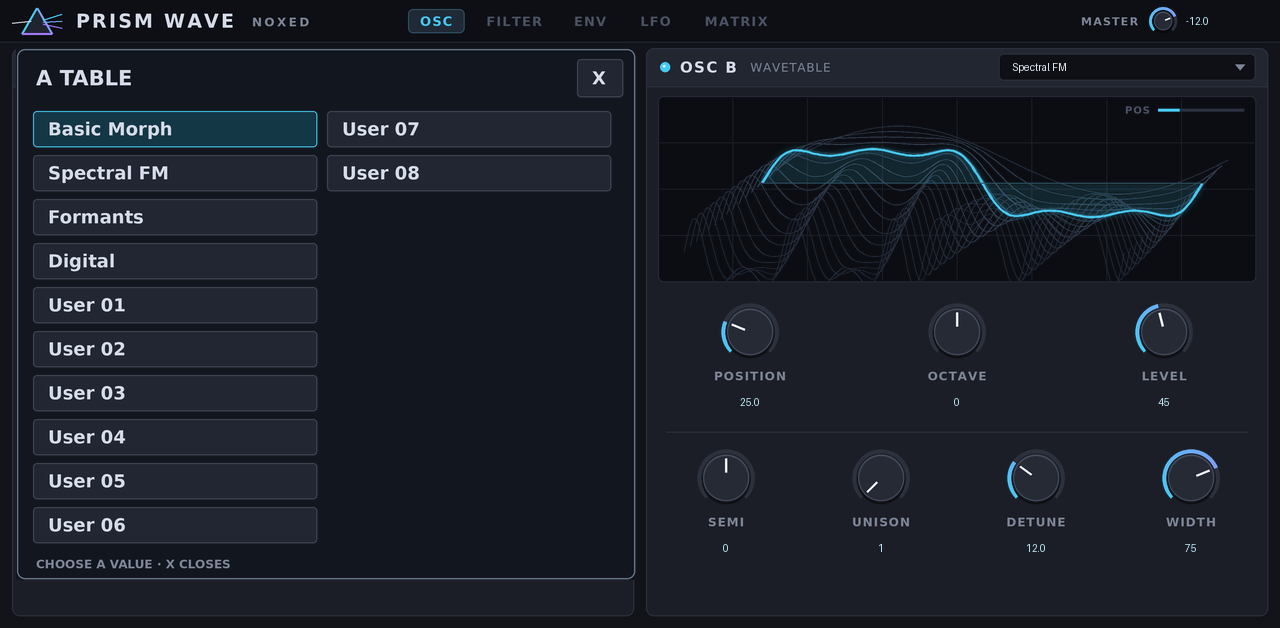
Prism Wave 0.1.4

  • Antippen eines Auswahlfeldes öffnet eine im Skin gezeichnete Liste links. Die Beschriftungen sind Teil der Button-Grafiken; die aktive Option wird markiert. Auswahl schließt die Liste, X schließt ohne Klangänderung.
  • Das umgeht das native MenuOverlay: Laut unabhängigem Hardware-Befund zeigt dieses bei externen VST2 auf Key 37 / OS 3.10.1.12 selbst mit replacementStrings leere Zeilen. Die transparente Hülle aus 0.2.2 war deshalb kein bestätigter Fix.
  • Bestehende Klangparameter-IDs und Reihenfolge bleiben erhalten. Ein UI-Parameter wird angehängt. Die nativen Listen der Bridge-Plugins werden mit diesem Update nicht geändert.

!Prism choice picker open

Geprüft: native, ARM32 und ARM64 Builds/Validatoren; Host-Simulator; Zweipass-Eingabe, Bindung/Pause, Accent/Slide, Pattern-Restore, Blockgrößen und keine Allokationen im Audio-Callback; Picker-Routing, Auswahl desselben Werts und Schließen nach State-Restore; Audio-Regressionen. Builds und Tests laufen auch in GitHub Actions. Klangvergleich/CPU und Touch auf echter MPC-Hardware bleiben offen.

Installation: Plugin-Ordner unverändert nach VST2 Plugins auf einem Laufwerk kopieren. MPC OS 3.10.1+, Enable Enhancements und External Plugin Support unter Preferences → Enhancements (Beta) sind erforderlich.

Die Bilder sind aus den tatsächlichen Skin-Dateien gerenderte Vorschauen, keine Fotos vom MPC.

OB-XD

Instrument v0.4.9

Before you start

Build
This build runs on every MPC, on MPC OS 3.10.1 or newer.
Which download
The plugin is published once per architecture. Take the build that runs on every MPC when there is one, the 64-bit build on a 64-bit MPC and the 32-bit build on a 32-bit one.

Downloads

The author says

OB-Xd v0.4.9

What's new

  • BROWSE page: larger text. Bank and patch names go from size 24 to 30, the BANKS / PATCHES titles and the page number from 24 to 28, and the small captions from 18 to 22.

Fixed

  • Triumpher listed twice: the Pads+FX bank had the same patch twice, once misspelt as "Truimpher". The duplicate is gone, so the bank has 32 patches. A project saved on a patch that came after it in that bank still recalls the right patch, because patches are recalled by name.

Install: see INSTALL.md inside the zip.


Built by GitHub Actions from 3dthc/OB-XD-MPC@87b8bbc with mpc-vst-plugins@8608070.

Odin2

Instrument v1.4.9

Before you start

Build
This build runs on every MPC, on MPC OS 3.10.1 or newer.
Which download
The plugin is published once per architecture. Take the build that runs on every MPC when there is one, the 64-bit build on a 64-bit MPC and the 32-bit build on a 32-bit one.

Downloads

The author says

Odin 2 v1.4.9

What's new

  • Mono output option: in Logic (and other hosts) the plugin can also go on a mono instrument track; the sound is the stereo sound folded to one channel.
  • MPC OS 3.10.1: the plugin folder carries a plugin.json, so it can be copied straight into VST2 Plugins, and an Akai SDK-format zip (-mpc-sdk.zip, one folder for every MPC) comes with the release.
  • Desktop VST3 for MPC Desktop and DAWs: Odin-2-1.4.9-macos-vst3.zip (one file for Apple Silicon and Intel Macs, with the same touchscreen skin in the plugin window) and Odin-2-1.4.9-windows-vst3.zip (64-bit, with the same skin in the plugin window).
  • Audio Unit for Logic Pro and GarageBand: Odin-2-1.4.9-macos-au.zip has the plugin as an Audio Unit (.component, Apple Silicon and Intel), with the same sound, skin window, presets and saved settings as the VST3. It passes Apple's auval validation. It's a separate download from the VST3 zip.
  • Device projects open on the computer: the VST3 has the VST2's official replacement ID, so a project saved on the MPC with this plugin loads it in MPC Desktop (controller mode) instead of showing a missing plugin, with the same sound and settings. A project saved on the desktop opens on the MPC the same way.
  • Window size on the desktop: right-click the plugin window (Control-click on a Mac) and pick 50% to 125%. It opens at 75% and remembers your choice for all of these plugins.

Fixed

  • Desktop: a safety net on the plugin's output: if a block ever came out broken (not a number, or far past full scale), it plays as silence instead of blasting the mix.
  • Desktop: the bank and patch arrows work again (a quick click was lost before).
  • Windows: MPC 3 now loads the plugin (before, it was listed but couldn't be added: a Windows-only interface ID layout bug). It's a single .vst3 file with its skin and sounds inside (unpacked once on first load), the format MPC 3 scans; no extra folders.
  • Desktop parameter list: in MPC 3 (controller mode, the MPC's screen) and in DAWs the plugin now lists only its sound controls, the knobs, switches and Q-Link controls, instead of every internal value (themes, browser, screen text). Picking a preset no longer marks it as edited (no "*").
  • Mac: macOS no longer blocks the plugin as "can't be verified" when installed with the one-line Terminal command in the zip's README.txt (it also unblocks copies you already installed).

Installing on macOS (Audio Unit and VST3)

Which zip?

  • Logic Pro / GarageBand: Odin-2-1.4.9-macos-au.zip (the Audio Unit)
  • MPC Desktop / other VST3 hosts: Odin-2-1.4.9-macos-vst3.zip (the VST3)

Both work on Apple Silicon and Intel Macs. Download one or both.

1. Leave the zip(s) in your Downloads folder. Unzipped or not, both are fine.

2. Open Terminal (Applications › Utilities › Terminal), paste this and press Return. It installs the plugins and clears macOS's "can't be verified" block. No password needed.

curl -fsSL https://raw.githubusercontent.com/3dthc/mpc-vst-plugins/desktop-vst3-openmpc/tools/install_mac_vst3.sh | bash

3. Check the Audio Unit: paste this and press Return. Every plugin should say PASS.

curl -fsSL https://raw.githubusercontent.com/3dthc/mpc-vst-plugins/desktop-vst3-openmpc/tools/install_mac_vst3.sh | bash -s -- --check

4. Restart Logic Pro (it looks for new Audio Units when it starts), or rescan plugins in MPC Desktop.

To check just this plugin: auval -v aumu Od2M 3Dth

Install: see INSTALL.md inside the zip.


Built by GitHub Actions from 3dthc/Odin2-MPC@85d5aa4 with mpc-vst-plugins@8608070.

Overcast

Effect v1.1.0

Before you start

Build
This build runs on every MPC, on MPC OS 3.10.1 or newer.
Which download
The plugin is published once per architecture. Take the build that runs on every MPC when there is one, the 64-bit build on a 64-bit MPC and the 32-bit build on a 32-bit one.

Downloads

The author says

Mutable Instruments Clouds with the Parasites firmware (six modes) plus a modulation page: two envelopes, two LFOs and an 8-slot matrix onto Clouds' CV inputs, and a built-in manual.

1.1.0 is built with Akai's official MPC Plugin SDK and runs on MPC OS 3.10.1 with Enhancements → External Plugin Support. No modded firmware or root access needed any more.

What's new

  • Modulation on the main page: a teal dot circles every knob the matrix moves, at the value Clouds really gets; the snowflake lights up while the matrix freezes.
  • Destination names follow the mode: the matrix lists name each destination as the current mode does (e.g. Oliverb's "Mod Amount" instead of "Reverb").
  • Freeze toggle: a white outline when on, so switching on no longer looks like a size jump.
  • Manual: larger text (15 px) and a "Support the project: Ko-Fi.com/padbangers" line under the topic list.
  • Same plugin ID and parameters as 1.0.x: projects saved with 1.0.x load in 1.1.0.

Install (MPC OS 3.10.1+)

  1. On the MPC: Preferences → Enhancements (Beta) → switch on Enable Enhancements and External Plugin Support.
  2. Unzip Overcast-1.1.0-mpc-sdk.zip and copy the folder Padbangers - VST - Overcast into the VST2 Plugins folder of a drive on the MPC (internal storage, SSD, SD card or USB).
  3. Restart the MPC. Overcast is listed under External Plugins (Insert effects).

Or install it with the Plugin Manager from the catalog. The per-build zips (-armv7 for first-generation devices, -aarch64 for second-generation) are what the Plugin Manager and the catalog installers use.

Tested

Akai MPC X, MPC OS 3.10.1 (2026-11-14). Not tested on MPC OS 3.9.1.

SHA-256

  • Overcast-1.1.0-mpc-armv7.zip: b619e2465800de4c8d7045a3965be323d1b715ea429c71565a73e9e58dc27667
  • Overcast-1.1.0-mpc-aarch64.zip: 116b19f8e3b58fbf7bc46e1014ac535190ada4427a72ff01f70326bcd40235a9
  • Overcast-1.1.0-mpc-sdk.zip: 1a00b02cb3889a3ce42257dcd88ae77f45220ab91ff2ad49ef08cd08ac3c98db

OxZygen

Instrument v0.7.7

Before you start

Build
This build runs on every MPC, on MPC OS 3.10.1 or newer.
Which download
The plugin is published once per architecture. Take the build that runs on every MPC when there is one, the 64-bit build on a 64-bit MPC and the 32-bit build on a 32-bit one.

Downloads

The author says

OxZygen v0.7.7

What's new

  • Instruments browser card: OxZygen now shows as its own card in Sounds > INSTRUMENTS. Tapping it opens the plugin's preset list (after the restart the installer does).
  • Presets on the Instruments card: tapping the OxZygen card in Sounds > INSTRUMENTS now lists all 200 factory presets; pick one to load OxZygen with that sound.
  • Updated zips (2026-11-17): if you downloaded this release earlier today, download it again and reinstall: the presets on the Instruments card are now grouped in their category folders, and preset names with a hyphen no longer split into their own folders. Projects are not affected.

Install: see INSTALL.md inside the zip.


Built by GitHub Actions from 3dthc/OxZygen@0d6adcc with mpc-vst-plugins@c4bef5d.

padstep-16-mpc

v0.6.0

Before you start

Build
This is the 64-bit build. It runs on the MPCs that use 64-bit software.
Which download
The plugin is published once per architecture. Take the build that runs on every MPC when there is one, the 64-bit build on a 64-bit MPC and the 32-bit build on a 32-bit one.

Downloads

piAMB

v0.1.0

Before you start

Build
This is the 64-bit build. It runs on the MPCs that use 64-bit software.
Which download
The plugin is published once per architecture. Take the build that runs on every MPC when there is one, the 64-bit build on a 64-bit MPC and the 32-bit build on a 32-bit one.

Downloads

The author says

πAMB 0.1.0 — First release

A generative ambient garden for Akai Force / MPC: port of AMB-1 by Charles Vestal (M-VAVE FM-1), after Music for Airports.

  • Engine: AMB-1 unchanged — pad (Rhodes or Voices), bells on four tape loops of unequal length, gliding bass, soft Euclidean pulse, one scale and one slowly drifting chord, tape echo and Dattorro plate reverb.
  • Eight pieces as native presets: Garden, Departures, Voices, Afternoon, Night Bus, Shoreline, Glass, Tides.
  • Living view on every page: chord name, ring of the twelve notes (chord, scale, root; tap to edit the scale), layer levels, bell loops and pulse flashes, progress to the next chord.
  • Seven pages after the FM-1: GARDEN, PAD, BELLS, BASS, PULSE, SPACE, SETUP — four controls each on the Q-Links.
  • Scale editing with the ring or MIDI notes (pads / keyboard); the root stays and at least three notes remain; MODE reads Custom.
  • Installation follows Akai's SDK rule: copy the plugin folder into VST2 Plugins. No installer script, no Synths folder, no MPC.settings entry.

Known limits: one sounding instance at a time; own tempo (30–120 BPM), not yet synced to the Force; Gen2 untested on hardware.

Tested on Force Gen1: about 14 % CPU, smooth display, no crackles. PC: sanitized engine, live view, scale rules, real VST2 wrapper, skin references.

piClideaN

v1.3.8

Before you start

Build
This is the 64-bit build. It runs on the MPCs that use 64-bit software.
Which download
The plugin is published once per architecture. Take the build that runs on every MPC when there is one, the 64-bit build on a 64-bit MPC and the 32-bit build on a 32-bit one.

Downloads

The author says

πClideaN 1.3.8 — maintenance

  • Installation follows Akai's SDK rule: each release is a plugin folder to copy into VST2 Plugins (Gen1 ARM32 and Gen2 ARM64 ZIPs). No installer script, no Synths folder, no MPC.settings registration. Remove an older catalogue installation with its own uninstall.sh first.
  • Code review fixes: the asynchronous waveform preview is enabled only once its worker thread really exists; the guidance worker initialises its scratch engine; dead parameter branches removed.
  • Colour charter: blue outline on selectors without a neutral value (WAVE, SYNC, RATE, track MODE); amber once MOD DESTINATION leaves NONE or COUNT-IN leaves OFF; purple chained destinations unchanged.
  • Thinner orange playhead outline on steps; larger MOD slider values; "Rdm 8" renamed "RDM 8"; track-page Q-Links limited to on-screen knobs.

UID, 4 096 published parameter indices, project format, factory programs and MIDI routing are preserved. Gen2 remains untested on hardware.

piMorpH

Instrument v0.1.3

Before you start

Build
This is the 64-bit build. It runs on the MPCs that use 64-bit software.
Which download
The plugin is published once per architecture. Take the build that runs on every MPC when there is one, the 64-bit build on a 64-bit MPC and the 32-bit build on a 32-bit one.

Downloads

The author says

πMorpH 0.1.3 — Smoother display

Force Gen1 / ARM32 release, with an untested Gen2 ARM64 variant. Sound, presets and projects are unchanged: the synthesis code is identical to 0.1.2, and 0.1.2 projects reopen with the same sound.

  • SPACE: lighter view. The 2,048-tile path drawing is removed. A gold cross shows X/Y and the path points appear as coloured, numbered dots; both follow the controls live. The blur and Processing… overlay are gone: the waveform stays visible and is redrawn after the gesture. The table name is left-aligned under the view.
  • MOTION: same coloured, numbered points (one colour per point on both pages) and a ring on the selected point.
  • FILTER: a single violet combined HP → LP response, which now follows the knobs smoothly (its values have their own small per-block budget). Title and legend now read HIGH PASS > LOW PASS / HPF > LPF: the device font has no arrow glyph.
  • Lower CPU and memory: the engine no longer computes the hidden path tiles; graphics reads no longer take the lock shared with audio rendering; skin images reduced from 155 MB to 89 MB decoded.
  • 36 passive display parameters appended (4,065 total); existing indices are unchanged.

PC validation: sanitized native engine and wrapper tests, notification budgets, skin references, and an A/B render showing byte-identical audio before and after the display changes. The candidate build was installed and used on Force Gen1.

PotentialBreaks

v1.9.0

Before you start

Build
This build runs on every MPC, on MPC OS 3.10.1 or newer.
Which download
The plugin is published once per architecture. Take the build that runs on every MPC when there is one, the 64-bit build on a 64-bit MPC and the 32-bit build on a 32-bit one.

Downloads

The author says

PotentialBreaks 1.9.0

  • New Hi-Fi look (the fifth on the LOOK selector, from PotentialBox): walnut cheeks, a brushed charcoal faceplate, raised panels, domed knobs lit in the plugin's colour, moulded cream keys and green glass displays.
  • The LOOK selector now has five looks: Print Plate, Night Rack, Colour Block, Vintage and Hi-Fi.

PotentialPatina

Effect v1.6.0

Before you start

Build
This build runs on every MPC, on MPC OS 3.10.1 or newer.
Which download
The plugin is published once per architecture. Take the build that runs on every MPC when there is one, the 64-bit build on a 64-bit MPC and the 32-bit build on a 32-bit one.

Downloads

The author says

PotentialPatina 1.6.0

  • A fourth look: Vintage. A late-80s drum machine: warm grey panel, cream keys with a hard shadow, an amber display, and PotentialPatina's own colour for what's selected. It is Potential1200's look, now in the whole PotentialSuite. Pick it with the LOOK keys on the SETTINGS (or SETUP) page; Print Plate stays the default.

PotentialPunch

Effect v1.6.1

Before you start

Build
This build runs on every MPC, on MPC OS 3.10.1 or newer.
Which download
The plugin is published once per architecture. Take the build that runs on every MPC when there is one, the 64-bit build on a 64-bit MPC and the 32-bit build on a 32-bit one.

Downloads

The author says

PotentialPunch 1.6.1

  • Fixed: the third row of presets (MODERN BUS ... DUB DRUMS) hung over the bottom edge of the PRESETS frame. All three rows now sit inside it, in every look.

PotentialWax

Instrument v1.9.1

Before you start

Build
This build runs on every MPC, on MPC OS 3.10.1 or newer.
Which download
The plugin is published once per architecture. Take the build that runs on every MPC when there is one, the 64-bit build on a 64-bit MPC and the 32-bit build on a 32-bit one.

Downloads

The author says

PotentialWax 1.9.1

  • New Hi-Fi look (the fifth on the LOOK selector, from PotentialBox): walnut cheeks, a brushed charcoal faceplate, raised panels, domed knobs lit in the plugin's colour, moulded cream keys and green glass displays.
  • The LOOK selector now has five looks: Print Plate, Night Rack, Colour Block, Vintage and Hi-Fi.

Profit8

Instrument v2.0.2

Before you start

Build
This build runs on every MPC, on MPC OS 3.10.1 or newer.
Which download
The plugin is published once per architecture. Take the build that runs on every MPC when there is one, the 64-bit build on a 64-bit MPC and the 32-bit build on a 32-bit one.

Downloads

The author says

Profit-08 2.0.2

New

  • Name a favourite. + FAV on BANKS now opens an on-screen keyboard with the program's name (up to 20 characters; SHIFT, DEL, SPACE). SAVE stores the sound under that name, CANCEL stores nothing.
  • RANDOM on BANKS picks a random program from every loaded bank.
  • The page buttons (< PAGE 1/3 >) moved into the Programs panel's header, far right, to make room.

Compatibility

  • Same sound engine, parameters and project format as 2.0.1: the new keys and keyboard are added after the existing parameters, so programs, favourites and projects load unchanged.

Tested

Offline: the host test (keyboard, RANDOM, favourites, project chunks) and the host simulator. On an MPC Live III with a beta build of this code: the keyboard, RANDOM and the new BANKS layout. The release zips were not installed.

SetBfree Organ

v0.4.0

Before you start

Build
This build runs on every MPC, on MPC OS 3.10.1 or newer.

Downloads

The author says

Native tonewheel organ with three drawbar manuals, rotary speaker, effects and keyboard splits.

Requirements

  • A first-generation MPC OS standalone device (32-bit ARM, like the Force, MPC Live / Live II, One, X and Key 61).

The installer refuses anything else. Newer models are untested.

  • Root shell access (SSH) to the device. Stock MPC OS doesn't offer this; you need a modded unit.
  • Tested on MPC OS with a Force. Installing plugins this way is unofficial: back up first, use at your own risk.

Install (scripted)

  1. Unzip, then copy the whole folder to the device, e.g. scp -r SetBfree-Organ-0.4.0 root@<device-ip>:/tmp/
  2. Run it: ssh root@<device-ip> sh /tmp/SetBfree-Organ-0.4.0/install.sh

The installer checks the device, stops MPC (save your project first), copies portable/SamplingHigh - VST - SetBfree Organ/ (the plugin, its skin and its data, as one folder) into /sdcard/Synths, backs up MPC.settings, adds the plugin to MPC's plugin list from the folder's plugin-meta.xml and starts MPC again. Running it again upgrades in place, keeping your own files. An older install of this plugin (the previous layout, with the .so in /sdcard/vst) is replaced, not duplicated. -y skips the confirmation prompt; -t <folder> installs into another Synths folder (for example on a card).

Then add SetBfree Organ to a track from the plugin browser (Instrument plugins). Its screen appears in the plugin view, and the Q-Links follow the page.

Full instructions, including installing by hand, are in INSTALL.md inside the zip.


Built by GitHub Actions from SamplingHigh/mpc-vst-setbfree@a3cb5fd with mpc-vst-plugins@9e7c001.

Shapey EQ

v1.6.3

Before you start

Build
This build runs on every MPC, on MPC OS 3.10.1 or newer.
Which download
The plugin is published once per architecture. Take the build that runs on every MPC when there is one, the 64-bit build on a 64-bit MPC and the 32-bit build on a 32-bit one.

Downloads

The author says

Shapey EQ v1.6.3

What's new

  • Mono and stereo layouts: Mono, Mono → Stereo and Stereo, so it fits mono tracks in Logic as well as stereo ones (MPC Desktop and other VST3 hosts too).
  • MPC OS 3.10.1: the plugin folder carries a plugin.json, so it can be copied straight into VST2 Plugins, and an Akai SDK-format zip (-mpc-sdk.zip, one folder for every MPC) comes with the release.
  • Gen2 MPCs: a -mpc-aarch64.zip for Gen2 devices (MPC Live III, Key 37, XL), next to the Gen1 -mpc-armv7.zip.
  • Desktop VST3 for MPC Desktop and DAWs: Shapey-EQ-1.6.3-macos-vst3.zip (one file for Apple Silicon and Intel Macs, with the same touchscreen skin in the plugin window) and Shapey-EQ-1.6.3-windows-vst3.zip (64-bit, with the same skin in the plugin window).
  • Audio Unit for Logic Pro and GarageBand: Shapey-EQ-1.6.3-macos-au.zip has the plugin as an Audio Unit (.component, Apple Silicon and Intel), with the same sound, skin window, presets and saved settings as the VST3. It passes Apple's auval validation. It's a separate download from the VST3 zip.
  • Device projects open on the computer: the VST3 has the VST2's official replacement ID, so a project saved on the MPC with this plugin loads it in MPC Desktop (controller mode) instead of showing a missing plugin, with the same sound and settings. A project saved on the desktop opens on the MPC the same way.
  • Window size on the desktop: right-click the plugin window (Control-click on a Mac) and pick 50% to 125%. It opens at 75% and remembers your choice for all of these plugins.

Fixed

  • Desktop: a safety net on the plugin's output: if a block ever came out broken (not a number, or far past full scale), it plays as silence instead of blasting the mix.
  • Effects: at small buffer sizes the host can hand the same buffer for input and output; the wrapper no longer overwrites input it hasn't read yet.
  • Windows: MPC 3 now loads the plugin (before, it was listed but couldn't be added: a Windows-only interface ID layout bug). It's a single .vst3 file with its skin and sounds inside (unpacked once on first load), the format MPC 3 scans; no extra folders.
  • Desktop parameter list: in MPC 3 (controller mode, the MPC's screen) and in DAWs the plugin now lists only its sound controls, the knobs, switches and Q-Link controls, instead of every internal value (themes, browser, screen text). Picking a preset no longer marks it as edited (no "*").
  • Mac: macOS no longer blocks the plugin as "can't be verified" when installed with the one-line Terminal command in the zip's README.txt (it also unblocks copies you already installed).

Installing on macOS (Audio Unit and VST3)

Which zip?

  • Logic Pro / GarageBand: Shapey-EQ-1.6.3-macos-au.zip (the Audio Unit)
  • MPC Desktop / other VST3 hosts: Shapey-EQ-1.6.3-macos-vst3.zip (the VST3)

Both work on Apple Silicon and Intel Macs. Download one or both.

1. Leave the zip(s) in your Downloads folder. Unzipped or not, both are fine.

2. Open Terminal (Applications › Utilities › Terminal), paste this and press Return. It installs the plugins and clears macOS's "can't be verified" block. No password needed.

curl -fsSL https://raw.githubusercontent.com/3dthc/mpc-vst-plugins/desktop-vst3-openmpc/tools/install_mac_vst3.sh | bash

3. Check the Audio Unit: paste this and press Return. Every plugin should say PASS.

curl -fsSL https://raw.githubusercontent.com/3dthc/mpc-vst-plugins/desktop-vst3-openmpc/tools/install_mac_vst3.sh | bash -s -- --check

4. Restart Logic Pro (it looks for new Audio Units when it starts), or rescan plugins in MPC Desktop.

To check just this plugin: auval -v aufx ShEQ 3Dth

Install: see INSTALL.md inside the zip.


Built by GitHub Actions from 3dthc/Shapey-MPC@9394ba8 with mpc-vst-plugins@8608070.

SlowOps.MPC.Looper

v1.1.0

Before you start

Build
This build runs on every MPC, on MPC OS 3.10.1 or newer.
Which download
The plugin is published once per architecture. Take the build that runs on every MPC when there is one, the 64-bit build on a 64-bit MPC and the 32-bit build on a 32-bit one.

Downloads

The author says

Looper by Slow Ops is a three-bank stereo looper for Akai MPC standalone. It captures 1, 2, 4 or 8 bars from a track in time with the MPC. You can overdub, start and stop banks on the beat, and use the built-in metronome.

!The LOOPS page on an MPC XL with two banks playing

Upgrading from 1.0: restart the MPC

The plugin is now called Looper. In 1.0 the MPC cut its name down to "Slow .ooper".

  1. Delete the old Slow Ops - VST - Slow Ops Looper folder from VST2 Plugins, then copy in the new Slow Ops - VST - Looper folder from the zip.
  2. Restart the MPC, or refresh its plugin list. Until you do, the MPC may keep showing the old name, or not find the plugin at all.
  3. If a saved project shows the plugin as missing, add Looper to that insert slot again. Its settings go back to the defaults.

What's new since 1.0.0

  • New name: Looper. It shows in full in the FX slot, under "Slow Ops".
  • Master STOP stops everything. The metronome goes quiet, the beat boxes hold on 1, and a capture that is counting in or recording is cancelled. The next master PLAY starts it all again from bar 1. The metronome now clicks while the looper is playing, with or without the MPC transport.
  • The bank dial turns while you record. A 4-bar capture shows 1/4, 2/4, 3/4, 4/4 as it records, then follows playback.
  • Cleaner re-recording. When you capture again into a bank that is playing (Next Bar), the old loop plays through the count-in, stops when recording starts, and the new loop comes in at full level on its first beat.
  • No more clipped first beat. A freshly recorded loop now starts with its first downbeat intact. Before, it started a few milliseconds late and faded in.
  • Auto Standby wakes up for a re-take. Re-recording your first loop with Next Bar, with no other loops, switches the metronome from Standby to On for the count-in and the recording, then back to Standby.
  • Play Timing defaults to Loop End. PLAY/STOP taps wait for each bank's loop to come round. Immediate and Bar End are still on the MIX page.

Install (new users)

  1. Download Looper-1.1.0-mpc-sdk.zip below and unzip it.
  2. Copy the folder Slow Ops - VST - Looper into a folder named VST2 Plugins at the top level of a USB drive, an SD card or the MPC's internal drive.
  3. On the MPC (MPC OS 3.10.1 or later), open Preferences → Enhancements (Beta) and switch on Enable Enhancements and External Plugin Support.
  4. Add Looper (Slow Ops, under External Plugins) as an insert on a track.

The user guide has the details. The -mpc-armv7 and -mpc-aarch64 zips hold the same build, packaged for the open-mpc Plugin Manager and installers; a manual install doesn't need them.

Known limits

  • Loops are not saved with the project. Resample the track to keep them.
  • Tested on an MPC XL and an MPC Live III, both running MPC OS 3.10.1. The download also includes a 32-bit build for the older standalone MPCs and Force, which hasn't been tried on a device yet.
  • This is a third-party plugin, not supported by Akai.

SlowOps.MPC.LufsVu

v1.0.1

Before you start

Build
This build runs on every MPC, on MPC OS 3.10.1 or newer.
Which download
The plugin is published once per architecture. Take the build that runs on every MPC when there is one, the 64-bit build on a 64-bit MPC and the 32-bit build on a 32-bit one.

Downloads

The author says

Analog VU meters, EBU R 128 loudness and a true-peak limiter: an insert effect for Akai MPC standalone (MPC OS 3.10.1+). Formerly "VU Meter".

METERLUFSSETUP
!METER!LUFS!SETUP

Install

  1. Download lufs-vu-1.0.1-mpc.zip below and unzip it.
  2. Copy the Slow Ops - VST - LUFS VU folder into a folder named VST2 Plugins at the top level of a USB drive, SD card or the MPC's internal drive.
  3. On the MPC: Preferences → Enhancements (Beta), then turn on Enable Enhancements and External Plugin Support. Restart the MPC.
  4. Add Slow Ops › LUFS VU as an insert effect (plugin browser → External Plugins).

The zip also contains LUFS VU User Guide.html, a one-page manual covering every control.

Updating from "VU Meter": delete the old Slow Ops - VST - VU Meter folder, then add LUFS VU again on any track that used it.

Tested on

  • MPC Live III (Gen2), MPC OS 3.10.1, 2026-11-16
  • MPC XL (Gen2), MPC OS 3.10.1, 2026-11-16

1.0.1

  • Adds the MIT LICENSE to the repository and to the release zip (LICENSE.txt). The audio, the controls and the skin are the same as in 1.0.0.

What's new in 1.0.0

  • LUFS tab: INTEGRATED, SHORT-TERM, MOMENTARY and TRUE PEAK MAX (ITU-R BS.1770 / EBU R 128), GAIN REDUCTION, CLEAR and RUN/HOLD. Verified against EBU Tech 3341 and FFmpeg ebur128.
  • AUTO loudness: steers the integrated loudness towards a TARGET (−23 to −9 LUFS), at most 0.5 dB/s, within ±12 dB.
  • True-peak LIMITER with a CEILING of −6.0 to −0.1 dBTP. It adds about 3.2 ms of latency, reported to the MPC, only while it is on.
  • METER: the walnut cabinet fills the page with larger dials. PEAK HOLD moved to SETUP; BYPASS and TRIM are on the LUFS tab (TRIM is also on Q-Link 15).
  • CALIBRATION adds 0 VU = −10 and −4 dBFS for dense, loud masters.
  • Data wheel: touch any control and turn the main data wheel; press it for the large editor.

Third-party plugins are not supported by inMusic / Akai. Save your work often.

Downloads

  • lufs-vu-1.0.1-mpc.zip: the plugin folder, an install guide and the user guide (recommended for MPC OS 3.10.1+).
  • LUFS-VU-1.0.1-mpc-sdk.zip: the same plugin folder alone, in the format the Open MPC catalog lists.
  • LUFS-VU-1.0.1-mpc-armv7.zip / LUFS-VU-1.0.1-mpc-aarch64.zip: Open MPC catalog packages (Gen1 / Gen2), with install.sh for modded units. These are used by the Open MPC Plugin Manager and installers.

Sonix

Instrument v0.3.16

Before you start

Build
This build runs on every MPC, on MPC OS 3.10.1 or newer.
Which download
The plugin is published once per architecture. Take the build that runs on every MPC when there is one, the 64-bit build on a 64-bit MPC and the 32-bit build on a 32-bit one.

Downloads

The author says

Sonix v0.3.16

What's new

  • Instruments browser card: Sonix now shows as its own card in Sounds > INSTRUMENTS. Tapping it opens the plugin's preset list (after the restart the installer does).
  • Presets on the Instruments card: tapping the Sonix card in Sounds > INSTRUMENTS now lists all 128 factory presets; pick one to load Sonix with that sound.
  • Updated zips (2026-11-17): if you downloaded this release earlier today, download it again and reinstall: the presets on the Instruments card are now grouped in their category folders, and preset names with a hyphen no longer split into their own folders. Projects are not affected.

Install: see INSTALL.md inside the zip.


Built by GitHub Actions from 3dthc/Sonix@2c32beb with mpc-vst-plugins@c4bef5d.

studio424

Effect v1.0.0

Before you start

Build
This build runs on every MPC, on MPC OS 3.10.1 or newer.

Downloads

The author says

First release of STUDIO424, an early-90s cassette four-track mixer channel in a pedal, for MPC standalone.

What it does

  • Trim into a gently saturating preamp: clean at the defaults, thicker and grittier as you push it.
  • Two-band shelving EQ: High at 10 kHz and Low at 100 Hz, ±10 dB each.
  • Channel level into a driveable mix bus, then a Master fader. Run Channel hot and Master low for bus glue.
  • Six built-in presets: Flat, Warm Bus, Hot Trim, Vocal Forward, Fat Drums and Thin Lo-Fi. The knobs and fader follow the preset.
  • One pedal-style Main page. Q-Links: Trim, High, Low, Channel, then Master.
  • Light on CPU: three filters and three soft-clip stages per channel.

Requirements

  • MPC OS 3.10.1 or later.
  • Preferences → Enhancements (Beta): turn on Enable Enhancements and External Plugin Support.
  • Works on 32-bit (MPC One, Live, X) and 64-bit (Live II, One+, Key 61, Key 37, X SE) models. Tested on an MPC One with MPC OS 3.10.1.

Install

  1. Unzip STUDIO424-1.0.0-mpc-sdk.zip.
  2. Copy the Lightlike - VST - STUDIO424 folder into a folder named VST2 Plugins at the top of a drive the MPC uses.
  3. Restart the MPC. STUDIO424 appears under External Plugins in the effect browser.

MIT licensed. Source and full documentation: https://github.com/lightlikemusic/studio424

The-8bit-Schmitter

Instrument v1.0.14

Before you start

Build
This is the 64-bit build. It runs on the MPCs that use 64-bit software.
Which download
The plugin is published once per architecture. Take the build that runs on every MPC when there is one, the 64-bit build on a 64-bit MPC and the 32-bit build on a 32-bit one.

Downloads

The author says

The 8Bit Schmitter is a drone synth inspired by timer and logic circuits. It combines four sound sources, two six-step sequencers, a modulation matrix, and effects derived from Mutable Instruments Clouds.

Downloads

  • Complete includes every edition and the manuals.
  • Standalone runs as a Windows application.
  • VST3 is the Windows plug-in for compatible hosts.
  • AKAI OS3.10.1 VST2 includes the Akai Force instrument and its English guide.
  • Browser is a single HTML file. Download it and open it in your browser.

Tropix

v0.1.6

Before you start

Build
This build runs on every MPC, on MPC OS 3.10.1 or newer.
Which download
The plugin is published once per architecture. Take the build that runs on every MPC when there is one, the 64-bit build on a 64-bit MPC and the 32-bit build on a 32-bit one.

Downloads

The author says

Tropix v0.1.6

What's new

  • Instruments browser card: Tropix now shows as its own card in Sounds > INSTRUMENTS. Tapping it opens the plugin's preset list (after the restart the installer does).
  • Presets on the Instruments card: tapping the Tropix card in Sounds > INSTRUMENTS now lists all 128 factory presets; pick one to load Tropix with that sound.
  • Updated zips (2026-11-17): if you downloaded this release earlier today, download it again and reinstall: the presets on the Instruments card are now grouped in their category folders, and preset names with a hyphen no longer split into their own folders. Projects are not affected.

Install: see INSTALL.md inside the zip.


Built by GitHub Actions from 3dthc/Tropix@d40c82e with mpc-vst-plugins@c4bef5d.

undertow

Effect v1.5.0

Before you start

Build
This is the 64-bit build. It runs on the MPCs that use 64-bit software.
Which download
The plugin is published once per architecture. Take the build that runs on every MPC when there is one, the 64-bit build on a 64-bit MPC and the 32-bit build on a 32-bit one.

Downloads

The author says

Altered delay with Analogue, Tape, Lo-Fi and Reverse modes, degrading repeats, runaway feedback and tempo sync. For MPC OS 3.10.1+ (Akai Force, MPC Live/One/X/Key, MPC XL, Live III).

Install

  1. Preferences > Enhancements (Beta): turn on Enable Enhancements and External Plugin Support.
  2. Unzip, copy Fullban - VST - Undertow into VST2 Plugins at the top of a drive (internal, SD card or USB).
  3. Restart MPC (a USB drive can just be re-plugged). Undertow is under External Plugins.

What's new in 1.5.0

  • New sepia background: a guitar and a horse-drawn carriage (the author's own photos). The mode name shows correctly on screen. Sound is unchanged from 1.0.0.
  • Installs the official Akai way (no SSH, no modded unit); one folder works on 32-bit and 64-bit units.

Tested on an Akai Force and an MPC XL (MPC OS 3.10.1).

VHS Vibes

Effect v1.5.3

Before you start

Build
This build runs on every MPC, on MPC OS 3.10.1 or newer.
Which download
The plugin is published once per architecture. Take the build that runs on every MPC when there is one, the 64-bit build on a 64-bit MPC and the 32-bit build on a 32-bit one.

Downloads

The author says

VHS VIBES 1.5.3 — the tape now reaches the machine.

A VHS tape degradation effect for Akai MPC standalone hardware: pitch wobble, tape saturation, generation loss, noise reduction, hum, hiss, crackle, deck faults and a dry/wet mix, on a hot pink cassette with reels that turn.

The delivery

Installing through the Open MPC Plugin Manager stopped with "Unexpected token" on every version from 1.4.0 to 1.5.2. The fault was in the package, not in the plugin: a helper script inside the Open MPC zips had the wrong line endings. It is corrected here.

The same zips now also keep a second copy of the plugin's binary at the top of its folder, so the Plugin Manager finds it where it looks after an install.

The direct download was never affected.

On the label

  • RPM is now Warp Rate and reads in Hz, 0.10 to 5.00, like the other three wobble rates. It is the same knob at the same settings.
  • Tape Speed (Type = VHS) names LP on the way from SP to EP, at 63 % of the knob, and gives the tape's speed in mm/s between the three.

Projects made with 1.3 to 1.5.2 load with every setting in place.

Install

  1. Download vhs-vibes-1.5.3-mpc.zip below and unzip it.
  2. Copy the folder anthonytheinventor - VST - VHS Vibes into a folder named VST2 Plugins at the top of a USB drive, an SD card or the MPC's internal drive (replace the old folder if an earlier version is there).
  3. On the MPC: Preferences > Enhancements (Beta), switch on Enable Enhancements and External Plugin Support, then restart the MPC.
  4. Find it in the plugin browser under External Plugins.

Needs MPC OS 3.10.1 or later. Builds for 32-bit and 64-bit MPCs are both in the zip, with INSTALL.txt and the README. The manual, VHS-Vibes-Manual.pdf, is attached below.

Or let Open MPC carry the tape for you: the armv7, aarch64 and sdk zips below are the ones its Plugin Manager and installers take.

the meter barely moves

Open MPC's CPU bench, on an MPC One+: 5.5 % of one audio block at the 99th percentile, 7.4 % at the worst. Verdict: PASS.

tip jar

VHS Vibes is free. If it ends up on your tracks, you can leave a tip at ko-fi.com/anthonytheinventor. It keeps the VCR running.

be kind ・ rewind

vulcan-rotary

Effect v1.0.0

Before you start

Build
This is the 64-bit build. It runs on the MPCs that use 64-bit software.
Which download
The plugin is published once per architecture. Take the build that runs on every MPC when there is one, the 64-bit build on a 64-bit MPC and the 32-bit build on a 32-bit one.

Downloads

The author says

Vulcan Rotary 1.0.0

A six-barrel rotary gate and stutter. The barrels spool up from rest and the rate is in real gun rounds per minute (2,500 / 4,000 / 6,000 / 7,200). Modes: Free, Input (your signal is the power supply) and Fire (automatable trigger). 13 programs.

Not yet tested on a real MPC (checked with Akai's host_sim and Open MPC's catalog check). Reports welcome: device, MPC OS version, what happened.

Two zips: *-mpc-armv7.zip for Gen1 (Live, Live II, One, X, Key 61/37, Force) and *-mpc-aarch64.zip for Gen2 (Live III, One G2, Key G2, XL).

Requirements

  • A first-generation MPC OS standalone device (32-bit ARM, like the Force, MPC Live / Live II, One, X and Key 61).

The installer refuses anything else. Newer models are untested.

  • Root shell access (SSH) to the device. Stock MPC OS doesn't offer this; you need a modded unit.
  • Tested on MPC OS with a Force. Installing plugins this way is unofficial: back up first, use at your own risk.

Install (scripted)

  1. Unzip, then copy the whole folder to the device, e.g. scp -r Vulcan-Rotary-1.0.0 root@<device-ip>:/tmp/
  2. Run it: ssh root@<device-ip> sh /tmp/Vulcan-Rotary-1.0.0/install.sh

The installer checks the device, stops MPC (save your project first), copies portable/Lumina Aerospace LLC - VST - Vulcan Rotary/ (the plugin, its skin and its data, as one folder) into /sdcard/Synths, backs up MPC.settings, adds the plugin to MPC's plugin list from the folder's plugin-meta.xml and starts MPC again. Running it again upgrades in place, keeping your own files. An older install of this plugin (the previous layout, with the .so in /sdcard/vst) is replaced, not duplicated. -y skips the confirmation prompt; -t <folder> installs into another Synths folder (for example on a card).

Then add Vulcan Rotary to a track from the plugin browser (Insert effects). Its screen appears in the plugin view, and the Q-Links follow the page.

Install by hand

  1. Copy portable/Lumina Aerospace LLC - VST - Vulcan Rotary/ to /sdcard/Synths/Lumina Aerospace LLC - VST - Vulcan Rotary/. It holds vulcan-rotary-arm32.so, plugin-meta.xml, version.xml, Plugin Skins/

and the data:

  1. Stop MPC: systemctl stop acvs. If there is no acvs service (systemctl cat acvs fails, as on some MPC OS 2.x versions and on Hakai-enabled systems), use systemctl stop inmusic-mpc.
  2. Back up the settings file, MPC.settings (on a Force: /media/az01-internal/Settings/MPC/MPC.settings).
  3. In MPC.settings, inside <VALUE name="pluginList-arm"><KNOWNPLUGINS>, add the line from plugin-meta.xml with

%payload-path% replaced by /sdcard/Synths. If there is no pluginList-arm value yet, add one just before </PROPERTIES>:

   <VALUE name="pluginList-arm">
     <KNOWNPLUGINS>
       (the line from plugin-meta.xml)
     </KNOWNPLUGINS>
   </VALUE>
  1. Start MPC: systemctl start acvs, or systemctl start inmusic-mpc if that is the service you stopped. If MPC shows default settings, restore your backup (the XML was malformed).

Edit MPC.settings only while MPC is stopped: MPC can save its own copy over a change made while it runs. Tools that rebuild the whole plugin list from the plugin folders in Synths keep this plugin, because it is such a folder.

Warpline

v1.0.0

Before you start

Build
This is the 64-bit build. It runs on the MPCs that use 64-bit software.
Which download
The plugin is published once per architecture. Take the build that runs on every MPC when there is one, the 64-bit build on a 64-bit MPC and the 32-bit build on a 32-bit one.

Downloads

The author says

First release of Warpline: a wavetable synth for standalone MPC, built on the open-source engine of Vital (by Matt Tytel) and running as a native plugin.

  • Plays .vital patches: wavetables, LFO shapes, modulation matrix, macros, effects and tunings stored in the patch.
  • 300 factory patches in 14 types (made with the engine from CC0 wavetables), with a type filter and a full-screen browser.
  • 84 controls on six custom touchscreen pages that follow the 16 Q-Links, velocity sensitivity, Live View.
  • Tested on an MPC Live III (64-bit build). The 32-bit build for older MPCs has not been run on hardware.

Downloads

  • warpline-1.0.0-mpc.zip: the plugin folder for MPC OS 3.10.1 and later (every MPC). Unzip it and copy the folder CLVRKE - VST - Warpline into VST2 Plugins at the root of a USB drive, SD card or the internal drive, then turn on Preferences > Enhancements (Beta) > External Plugin Support. INSTALL.txt inside has the steps. This is the build tested on the MPC Live III.
  • Warpline-1.0.0-mpc-aarch64.zip: MPC Live III, MPC XL and other 64-bit (Gen2) MPCs.
  • Warpline-1.0.0-mpc-armv7.zip: older 32-bit (Gen1) MPCs and the Force. Expect light patches and few voices there.

The two per-build zips are for the Open MPC catalog and its Plugin Manager, and for older firmware: each has an INSTALL.md (scripted or by-hand install into the MPC's Synths folder, which needs root access).

Installing preset banks

  1. A .vitalbank file is a zip: rename it to .zip (or open it with 7-Zip) and extract it on your computer.
  2. Copy the extracted folder (or single .vital files) into Warpline/Patches/ at the root of the drive that holds the plugin (create it): next to VST2 Plugins if you copied the plugin by hand, or next to Synths (e.g. /nvme/Warpline/Patches on a Live III) if you used the installer or Plugin Manager (this second location hasn't been tested on an MPC yet).
  3. Reload Warpline (or the project). The patches appear with two-letter type codes in the Patch control, the browser and the MPC preset list.

Only .vital files are used; the wavetables are inside each patch. Up to 6,000 patches are listed. Full details: README.

Checksums (SHA-256)

f85cc9d9583bb0074b07efb87e55818ef36d2263192ce0ead7c2ec4793cc9d5c  warpline-1.0.0-mpc.zip
a19d3ecc0ab44ab566be08e009f6f5aa8ed379aa1cd662b865f5aaa7786e1355  Warpline-1.0.0-mpc-aarch64.zip
821c3472247b37e9abb6a8280db0829ac83bb7c0988eef306f9fbef9d11c2fe1  Warpline-1.0.0-mpc-armv7.zip

Licence: GPL-3.0-or-later. Vital is (c) Matt Tytel, GPLv3; "Vital" is his trademark; Warpline is not made or endorsed by Vital Audio. Source for this release: tag v1.0.0.

XXL-Strips

v0.1

Before you start

Build
This is the 32-bit build. It runs on the MPCs that use 32-bit software.

Downloads

The author says

XXL set 0.1

Four free plugins for Akai Force / MPC OS (ARMv7), all in this one release.

DownloadWhat it is
XXL-STRIP-0.1.1-mpc-armv7.zipXXL STRIP: an emulation of a classic large-format British console channel strip (4000 E / G style): drive, filters, four-band EQ in three models, compressor, gate / expander, VU meter.
XXL-STRIP-BUS-0.1.1-mpc-armv7.zipXXL STRIP BUS: an emulation of the classic console stereo bus compressor (G-series style), with a VU meter.
XXL-STRIP-MASTER-0.1.1-mpc-armv7.zipXXL STRIP MASTER: master-bus strip in the same console style: drive, shelving EQ, high-frequency compressor, stereo image, transformer stage.
XXL-Pro-0.1.0-mpc-armv7.zipXXL Pro: fifteen emulations of classic studio processors on a patch bay (list below).

XXL Pro ("Pro" is for Process) is fifteen emulations of classic studio processors in one plugin, joined on a patch bay: patch any module into any other and into the output, in series or in parallel.

ModuleEmulation of
XXL-2ALA-2A-style optical tube levelling amplifier
XXL-1BCL 1B-style optical tube compressor
XXL-16VU160 VU-style VCA compressor / limiter
XXL-761176-style FET limiting amplifier
XXL-67670-style stereo vari-mu tube limiter
XXL-DISSDistressor-style character compressor
XXL-731073-style preamp and EQ
XXL-55A550A-style 3-band proportional-Q EQ
XXL-56560-style 10-band graphic EQ
XXL-EQ1-AEQP-1A-style passive program equalizer
XXL-MQ-5MEQ-5-style passive mid-range equalizer
XXL-A80A80-style multitrack tape machine
XXL-AT12ATR-102-style mastering tape recorder
XXL-224224-style digital reverb
XXL-480R480L-style digital reverb

Unzip the one you want and run install.sh on the device; uninstall.sh removes it. Free.

Tested and running on an Akai Force (L'Cronx, 2026-11-14). SHA-256 sums: SHA256SUMS.txt in this release.

Z950

Effect v1.0.1

Before you start

Build
This is the 64-bit build. It runs on the MPCs that use 64-bit software.
Which download
The plugin is published once per architecture. Take the build that runs on every MPC when there is one, the 64-bit build on a 64-bit MPC and the 32-bit build on a 32-bit one.

Downloads

The author says

Keebz Z950 v1.0.1

Z950 is an insert effect for Akai MPC standalone hardware. It is a live S-series style time stretch and pitch shift (CYCLIC and INTELL modes, after the Akai S1000), an S900/S950 style low-pass filter, 8/12/16/24-bit and sample-rate reduction, a CD-deck Cue / Jog scrub, a turntable-style Speed control and a Punch In / Punch Out looper. The touch screen is styled after an Akai S950 front panel.

Disclaimer

Z950 is experimental software, provided "AS IS", without warranty of any kind, express or implied. You use it entirely at your own risk. It was made and tested on an MPC Live III only; other MPC models that run external plugins should load it but are untested. Not affiliated with, endorsed by or connected to Akai Professional or inMusic. Built with the inMusic MPC Plugin SDK (MIT). All code is original; no Akai code or data is included.

Downloads

FileWhat it is
Keebz - Z950 v1_0_1.zipThe plugin for a stock MPC: the folder you copy to your drive (MPC OS 3.10.1+)
Z950-1.0.1-mpc-aarch64.zipThe same plugin packaged for the Open MPC catalog and installer (Gen2, e.g. Live III)
Z950-1.0.1-mpc-armv7.zipOpen MPC package for 32-bit devices (untested on a device)
Z950 Quick Start.pdfThe Quick Start guide (10 pages)

What's new in 1.0.1

  • Fixed: raising Pitch with Length at 100 sounded staticy and distorted (introduced in an earlier test build). Live pitch shifting is now clean in both CYCLIC and INTELL. With Pitch on the sound is about 25-90 ms late.
  • Help pages, Quick Start and README updated: Pitch delay, and that Z950 works on any track and as a sampler FX on live audio input.

Requirements

  • An Akai MPC running MPC OS 3.10.1 or later (tested on the MPC Live III)
  • An SD card or USB drive, or the MPC's internal drive in computer mode
  • External Plugin Support switched on (step 1 below)

Installation

  1. Enable external plugins on the MPC. Open Preferences > Enhancements (Beta) and switch on Enable Enhancements and External Plugin Support. Restart the MPC if it asks you to.
  2. Download and unzip Keebz - Z950 v1_0_1.zip on your computer. It contains one folder, VST2 Plugins, and inside it one folder, Keebz - VST - Z950.
  3. Merge, do not replace. If your drive already has a VST2 Plugins folder, open it and copy only the Keebz - VST - Z950 folder into it. Do not replace your existing VST2 Plugins folder, or you will remove your other plugins. Keep the folder name exactly as it is.
  4. Put the drive back in the MPC (or mount the internal drive) and let it rescan.
  5. Use it. Open a track, add an insert effect, and choose Z950 from the Keebz plugins. Press the HELP key in the plugin for a two-page guide; the Quick Start PDF covers everything in more detail.

To remove it, delete the Keebz - VST - Z950 folder from VST2 Plugins.

Notes

  • Z950 is an insert effect: it processes the audio of any track it is inserted on, and also works as a sampler FX on live audio input. It receives no MIDI.
  • Touch strip scrub: the MPC sends no MIDI to effect plugins, so put the strip in Crossfader mode and assign the Jog parameter to it in Q-Link Edit.
  • Not verified on a real MPC: the host refreshing the screen when the plugin changes a parameter itself, and the CPU load of INTELL mode at high Qual.
  • Projects saved with earlier test builds (Deep Stretch / Keebz Stretch) are not compatible.

By Keebz - Keebz.com - Instagram: @LeeKebler - Github: Github.com/Keebz

Licence: MIT.