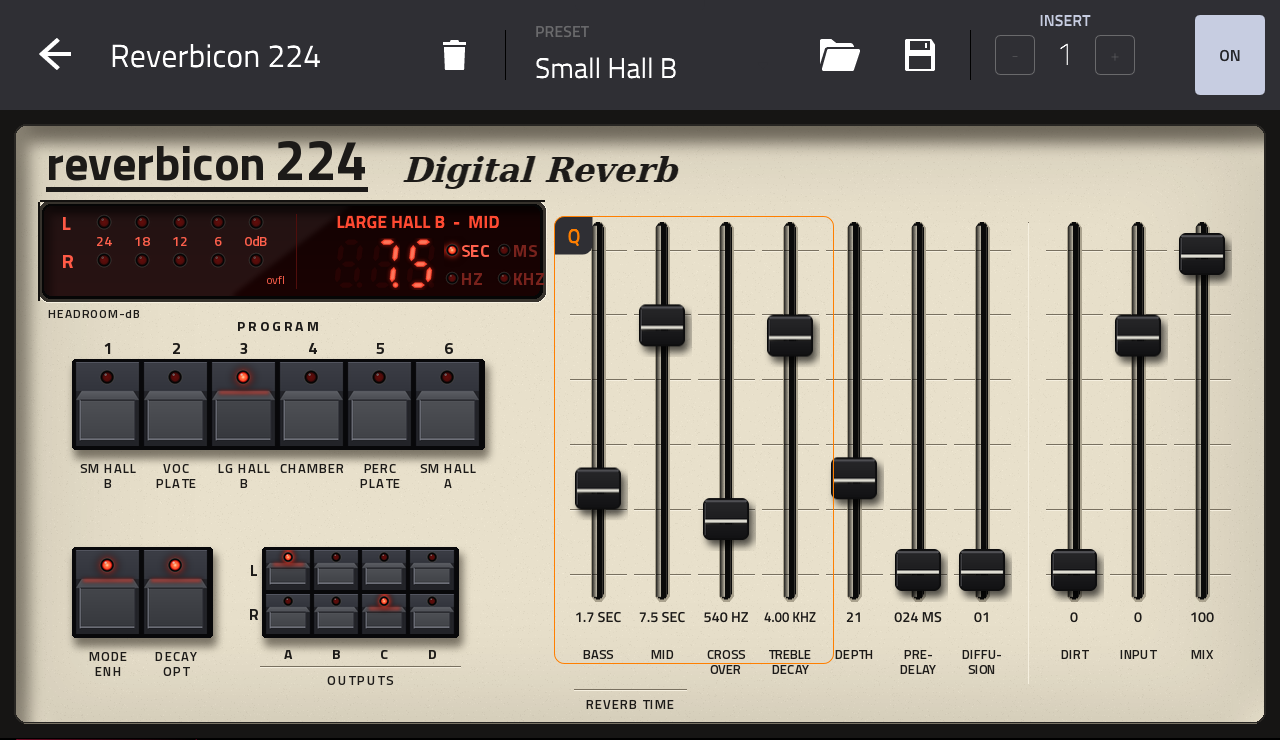
mpc-vst-reverbicon224
v1.0.0Effect
A Lexicon 224 (original, firmware v4.4) style reverb as a native effect plugin for Akai MPC OS standalone devices
- Developer
- sd88me
- Released
- November 17, 2026
- Versions
- 1
- Downloads
- 450
The free Akai MPC plugins we picked and checked by hand, with the downloads, the checksums and the install steps. They run on the Gen 1 and the Gen 2 MPCs, on MPC OS 3.10.1 or newer. Filter by type, developer, licence and tag.
These plugins run on the Gen 1 and the Gen 2 MPCs. That is the Live, Live II, XL, One and Force, and the Live III, One Gen 2 and Key 37 Gen 2. They need MPC OS 3.10.1 or newer, with the enhancements switched on. They do not run on the MPC Sample: that machine has its own firmware, and the mods built for it are on their own page.
1 plugin
A Lexicon 224 (original, firmware v4.4) style reverb as a native effect plugin for Akai MPC OS standalone devices
Idle Foundry's CA-72, a circuit-modelled homage to the 1970s Minimoog Model D synthesizer ported as a MPC VST Plugin host for standalone devices.
Picked, checked and written up by hand for this catalog.
Runs on the Gen 1 and the Gen 2 MPCs, on MPC OS 3.10.1 or newer. It does not run on the MPC Sample.
When the plugin has a build that runs on every MPC, take that one. It needs MPC OS 3.10.1 or newer.
Unzip the archive on your computer, then copy the plugin folder into the "VST2 Plugins" folder.
On MPC OS 3.10.1 and newer, external plugins only load when the enhancements are on. Go to Menu > Preferences > Enhancements, set Enable Enhancements to On and turn on the plugin support.
Open a track, load the plugin from the browser under Instrument or Effect plugins, and it appears with its own screen.
Model-72 now runs on Akai's MPC Plugin SDK. It is the same instrument and the same plugin: same name, same id and the same parameters, so projects saved with 1.x open with their sound. Install it over 1.x.
New
menu (U01 to U64); - DELETE PRESET removes the picked one. Kept in the plugin's folder and kept when you update.
(MPC Live III and other 64-bit MPCs), in LO on the Force and Gen1.
mixer). Double tap a knob for the large knob view.
-mpc-sdk.zip), next to the per-device zips.Downloads: *-mpc-armv7.zip for the Force and Gen1 MPCs (MPC OS 3.9.x and later), *-mpc-aarch64.zip for Gen2 (MPC Live III and kin), *-mpc-sdk.zip: one folder for both, MPC OS 3.10.1+. Restart MPC after installing (skins load at its start).
Tested: on an MPC Live III (skin, Q-Links, presets, QUALITY, pitch wheel). The Force build passes the offline tests; 2.0 has not been run on a Force yet (1.0 was). Loading a 1.x project was tested offline with a state the 1.x engine wrote. Reports welcome.
Delete the plugin folder from the "VST2 Plugins" folder on the device. Move it out of the way instead of deleting it when you want to keep your own files, presets or samples that are inside it.
| Version | Released | Downloads | Checksums | Download |
|---|---|---|---|---|
| 2.0.0 | 2026-11-18 | 1,216 | All MPCs | |
| 1.0.1 | 2026-10-21 | 3,780 | All MPCs | |
| 1.0.0 | 2026-10-15 | 1,061 | 64-bit (aarch64) |